| Lesson 2 | Entity Relationships |
| Objective | Define the concept of an entity relationship and explain how it is modeled and implemented. |
Entity Relationships: Concept, Notation, and Implementation
What a Relationship Captures
- Cardinality — how many instances can/must relate (1:1, 1:M, M:N).
- Participation (Optionality) — whether the relationship is mandatory or optional for each side.
- Business semantics — the verb phrase that explains the association.
Cardinality & Participation (at a glance)
- One-to-One (1:1): One instance relates to at most one on the other side (often used to isolate rarely populated attributes or segregate sensitive data). Participation may be optional or mandatory on either side.
- One-to-Many (1:M): One parent instance relates to many child instances (e.g., Department has many Employees). Implement with a foreign key in the “many” side.
- Many-to-Many (M:N): Many instances on each side relate to many on the other (e.g., Student ↔ Course). Implement via a junction (associative) table that holds the two foreign keys and any relationship attributes.
Participation: If the association is mandatory for a child, the child’s foreign key is NOT NULL (and often given a suitable referential action). If it’s optional, the foreign key may be nullable.
From ERD to Relational Schema
- 1:M → add a foreign key column to the child table referencing the parent’s primary key. Consider indexing the foreign key for join performance.
- M:N → create a junction table with a composite primary key (
FK_A, FK_B) or a surrogate key plus a unique constraint on (FK_A, FK_B). Add any attributes that belong to the relationship itself (e.g., AssignedDate, Role). - 1:1 → use a shared primary key or a unique foreign key; document why the split exists (privacy, volatility, or sparsity).
Worked Example: EMPLOYEE & PROJECT
Business rule: An employee may be assigned to several projects, and a project may have several employees. In this example, either may exist without an assignment. This M:N relationship is modeled with an associative entity; every assignment must reference one existing employee and one existing project.
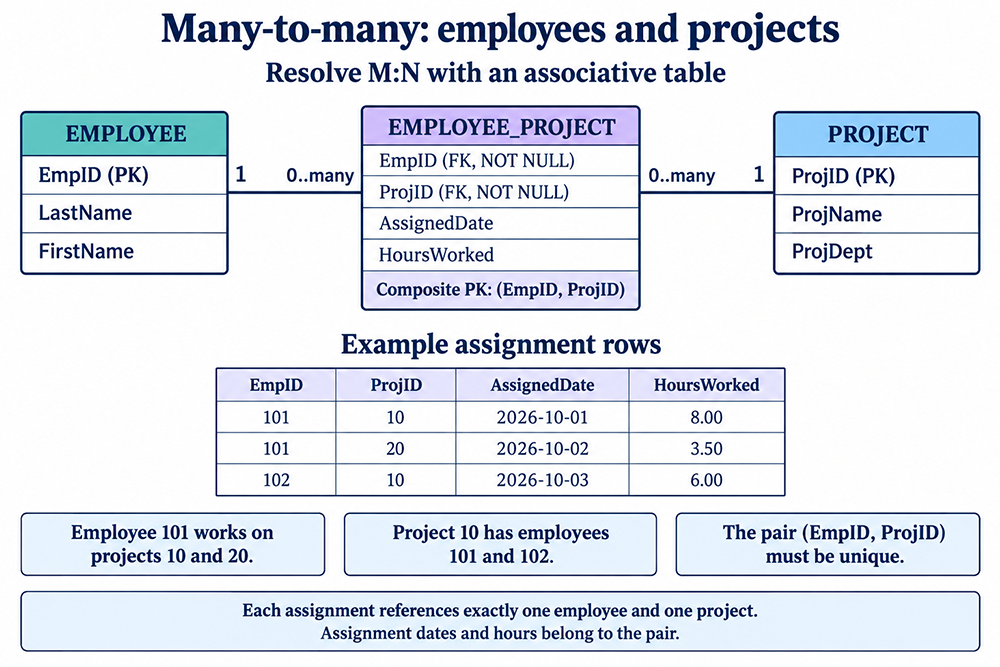
(EmpID, ProjID) forms one composite primary key; AssignedDate and HoursWorked describe that assignment.
-- EMPLOYEE (parent)
CREATE TABLE EMPLOYEE (
  EmpID      INT PRIMARY KEY,
  LastName   VARCHAR(50) NOT NULL,
  FirstName  VARCHAR(50) NOT NULL
);

-- PROJECT (parent)
CREATE TABLE PROJECT (
  ProjID     INT PRIMARY KEY,
  ProjName   VARCHAR(100) NOT NULL,
  ProjDept   VARCHAR(100)
);

-- Junction table to resolve M:N
CREATE TABLE EMPLOYEE_PROJECT (
  EmpID        INT NOT NULL,
  ProjID       INT NOT NULL,
  AssignedDate DATE,
  HoursWorked  DECIMAL(7,2),
  CONSTRAINT pk_employee_project PRIMARY KEY (EmpID, ProjID),
  CONSTRAINT fk_emp FOREIGN KEY (EmpID) REFERENCES EMPLOYEE(EmpID),
  CONSTRAINT fk_proj FOREIGN KEY (ProjID) REFERENCES PROJECT(ProjID)
);
| EmpID | ProjID | AssignedDate | HoursWorked |
|---|---|---|---|
| 101 | 10 | 2026-10-01 | 8.00 |
| 101 | 20 | 2026-10-02 | 3.50 |
| 102 | 10 | 2026-10-03 | 6.00 |
Employee 101 works on two projects, while project 10 has two employees. Either identifier can repeat, but inserting the pair (101, 10) again would violate the composite primary key. The hours belong to a particular employee-project assignment, not to the employee or project alone. This design records one row per pair; repeated assignment periods would require a different key or a separate history table.
Why this works: The composite primary key prevents duplicate assignments; foreign keys preserve referential integrity; optional attributes (e.g., HoursWorked) live where the relationship occurs.
Modeling Checklist
- Name relationships with clear verbs (e.g., places, contains, assigned to).
- State cardinality and participation explicitly; avoid ambiguity.
- Put foreign keys on the “many” side; use junction tables for M:N.
- Keep relationship attributes (e.g., quantities, dates, roles) on the junction table, not on either parent.
- Enforce integrity with
NOT NULL,UNIQUE, and foreign keys; index foreign keys for performance.
Entity Relationships - Exercise
Entity Relationships - Exercise
The next lesson introduces the three basic relationship types in more detail.