| Lesson 9 | Identifying many-to-many relationships |
| Objective | Identify many-to-many relationships from requirements, notation, and data symptoms. |
How to Identify Many-to-Many Relationships in Database Design
A many-to-many (M:N) relationship permits several related instances in both directions. A student may enroll in several classes, and a class may have several students. You need both statements to establish M:N; observing one student in several classes establishes only the first direction.
As in Lesson 8, distinguish the conceptual association from its implementation. The association is valid in a conceptual ER model. A junction table provides the usual normalized relational representation of its pairs.
Recognize M:N from Requirements
- Define the two entity roles. Student represents a person studying; Class represents a particular scheduled class offering in this example.
- State the maximum in each direction. How many classes may one student take? How many students may one class admit?
- Specify the minimum separately. Here, a student may exist before enrolling, and a class may exist before anyone enrolls.
- Identify facts about the association. Enrollment date and grade describe one student's participation in one class.
Association attributes are useful evidence that the association deserves a row, but they do not prove M:N by themselves. A one-to-many association may also have meaningful attributes. Likewise, whether one entity is said to “own” another does not determine its cardinality.
Read Notation Without Confusing Minimum and Maximum
In a conceptual Crow's Foot diagram, many endpoints on both sides indicate M:N. The accompanying circle or bar specifies optional or mandatory participation. Numerical labels such as 0..* and 1..* express those minimums and maximums directly.
The figures use numerical labels rather than a complete specification of a drawing notation. Review Crow's Foot symbols for endpoint combinations. When Enrollment is drawn explicitly, expect two parent-to-junction 1:N relationships; the underlying Student/Class association remains M:N.
Use Data Symptoms as Questions, Not Proof
- Lists of class identifiers in a student field: Ask whether each list entry should be an enrollment row with its own reference.
- Repeated fields such as ClassID1, ClassID2 and ClassID3: Ask what happens when a fourth class is needed.
- Student details repeated for each class: Determine whether the data is a report, an import format, or the intended storage table.
- Grades stored against a student alone: Ask how the design distinguishes that student's grade in each class.
Repeated identifiers are not inherently erroneous. StudentID should repeat across a student's enrollment rows, and ClassID should repeat across a class's students. The question is which facts and combinations the table is intended to store.
Worked Example: Student and Class
Cindy Jones (53985) takes Finance (854), Statistics (768) and Spanish II (708). Leo Cruz (62292) takes Spanish II and Finance. Joanna Smith (58889) takes Statistics. These are six distinct student-class associations.
1. State the Conceptual Relationship
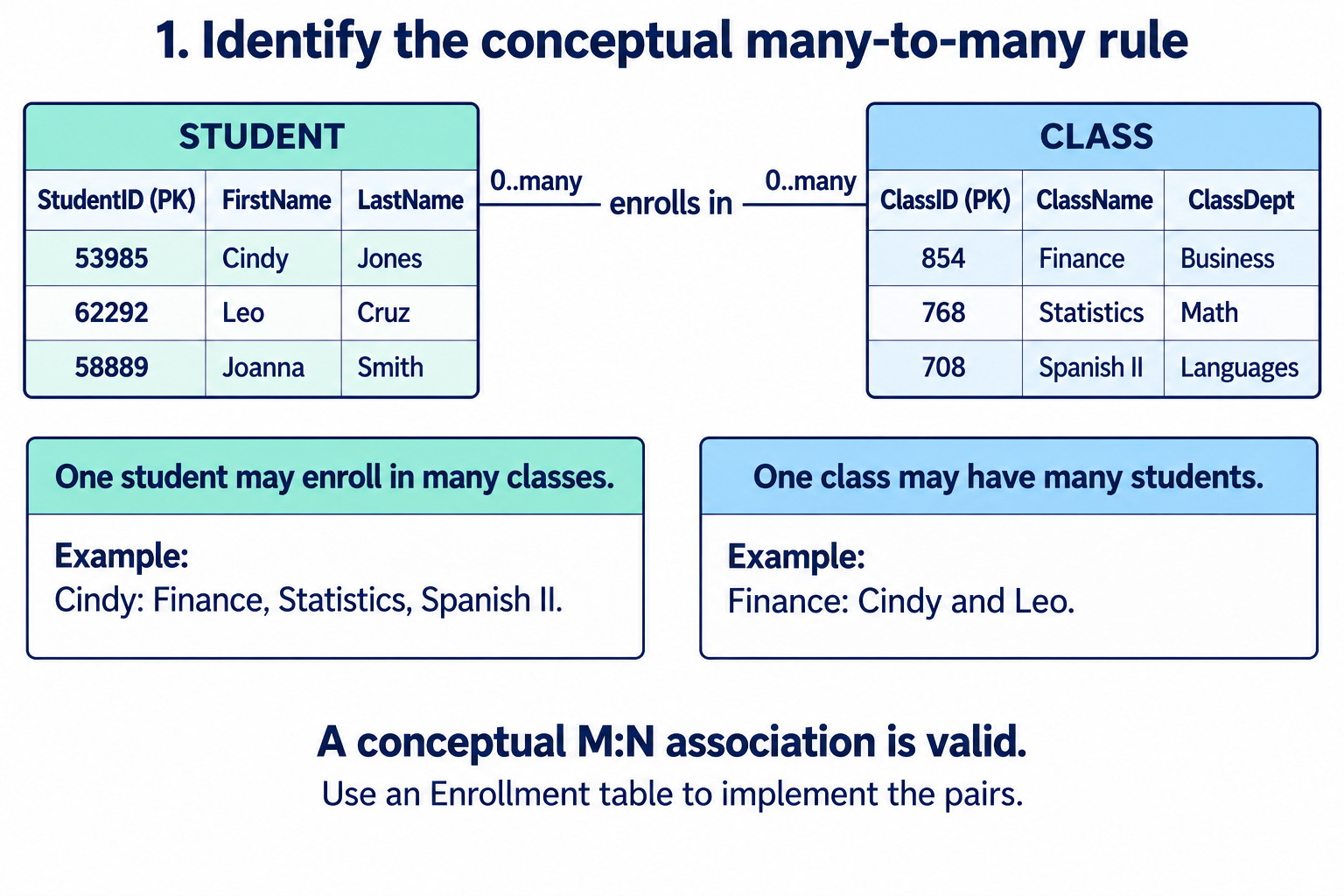
Cindy supplies evidence for several classes per student; Finance, shared by Cindy and Leo, supplies evidence for several students per class. Confirm that these operations are allowed by the business rule, rather than relying only on today's sample.
2. Test the Single-Foreign-Key Attempt
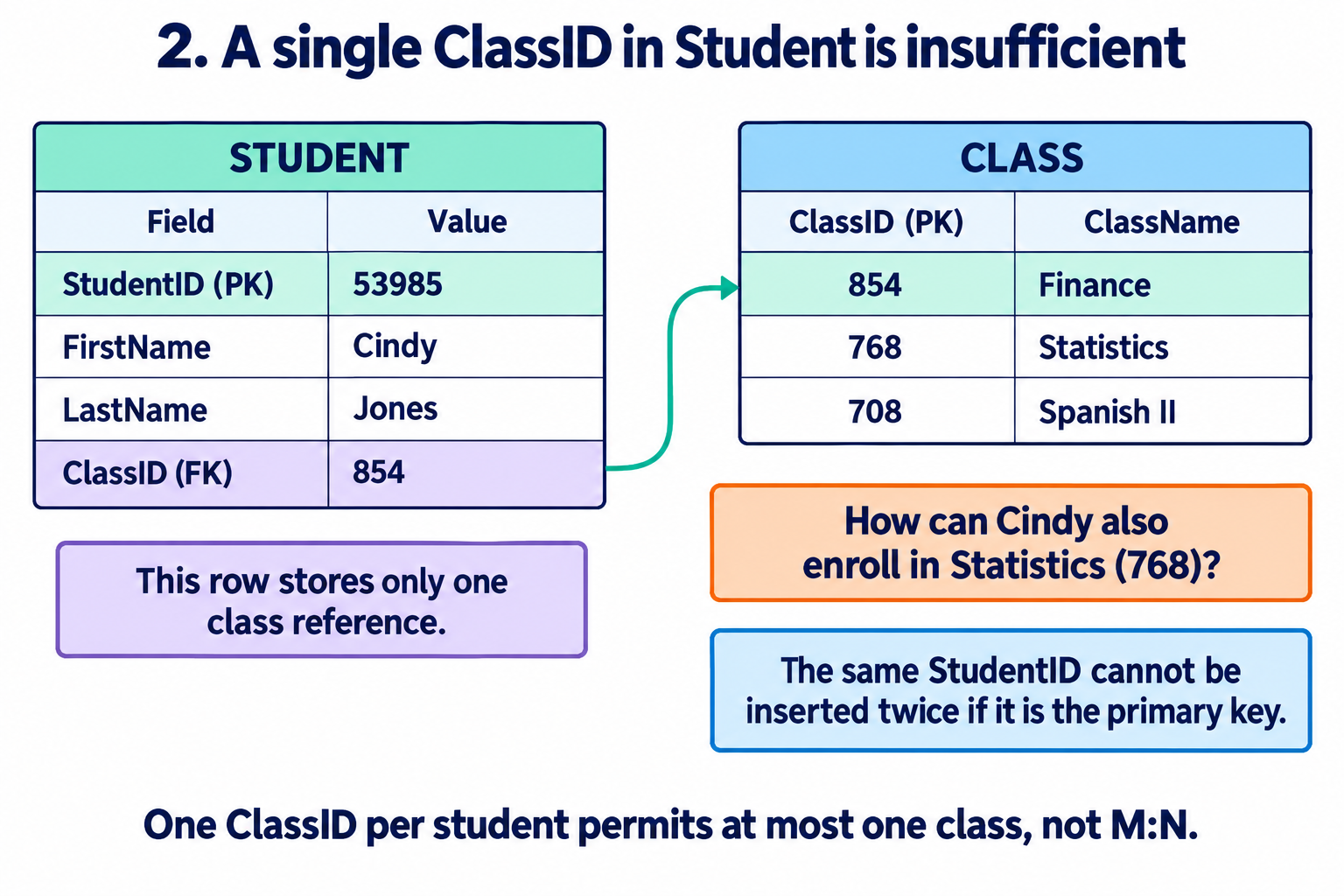
If StudentID is the primary key, a second Student row for 53985 would violate it. Replacing the ClassID value with 768 would lose the Finance association. Moving a single StudentID reference into Class would create the opposite limitation: one student per class.
3. Reject Repeating Class Fields
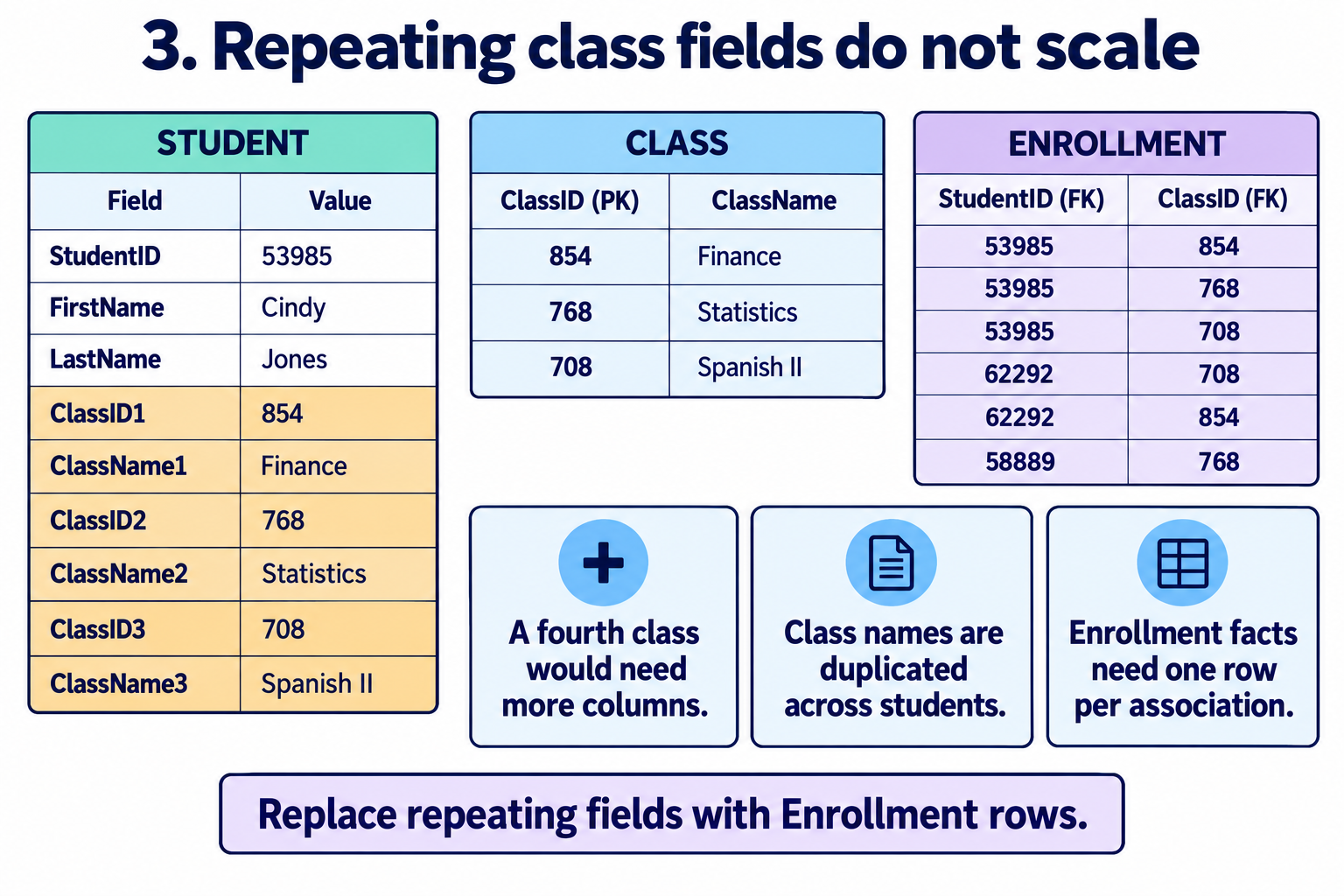
A fourth enrollment should add an association row, not require new student columns. Adding ClassName beside a single ClassID does not solve cardinality either; it repeats a name already determined by ClassID. Use a Class table to hold class facts and an Enrollment table to record participation.
4. Inspect the Repeated Facts
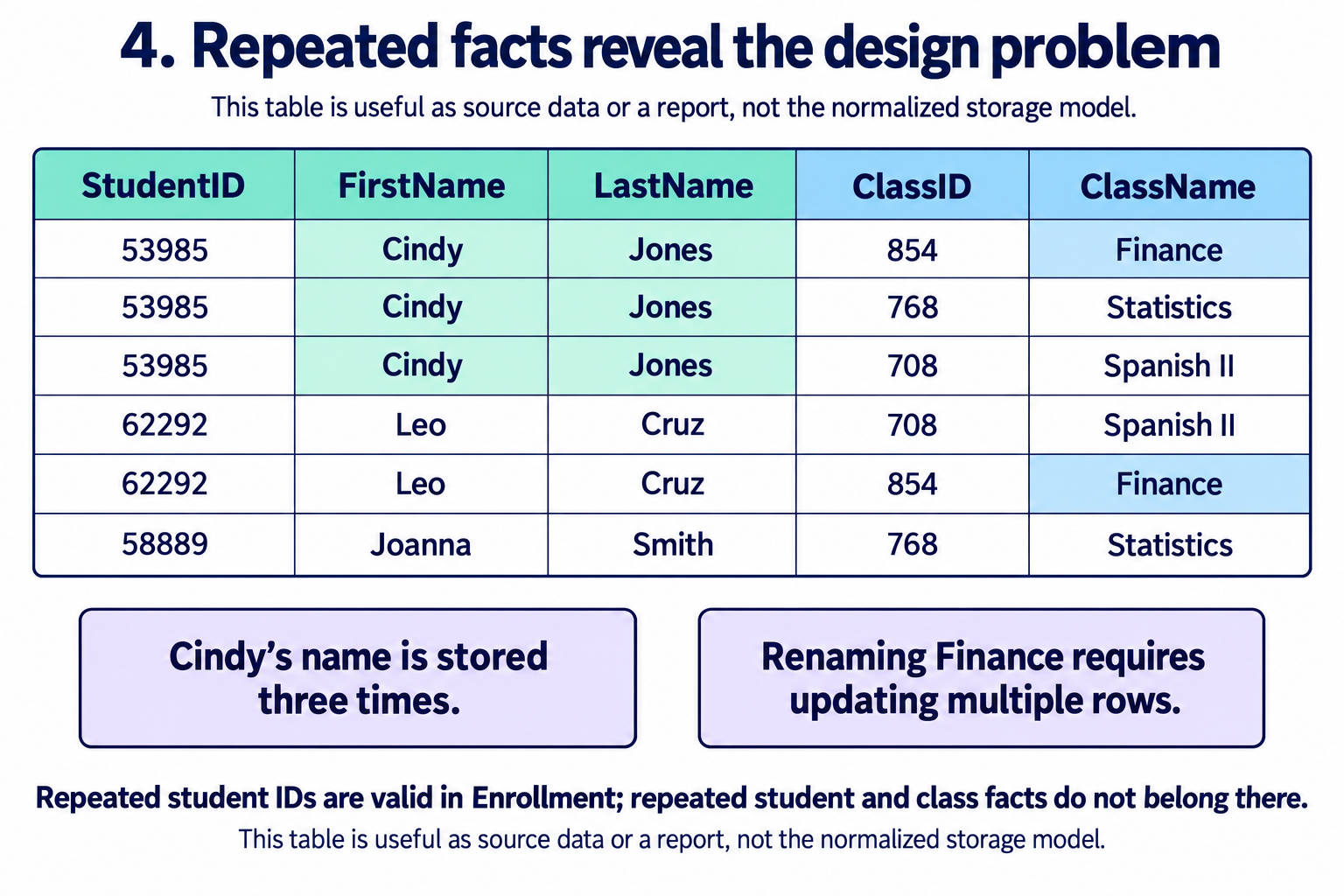
Renaming Finance would require changing both rows containing ClassID 854 in this flattened table. Correcting Cindy's name would require three updates. An incomplete update could leave contradictory values for the same identifier.
The rows are not identical duplicates, and repeated identifiers alone do not show a violation of first normal form. The design concern is the dependency of student names on StudentID and class names on ClassID, while one association is identified by the pair.
5. Store Students, Classes and Enrollments Separately
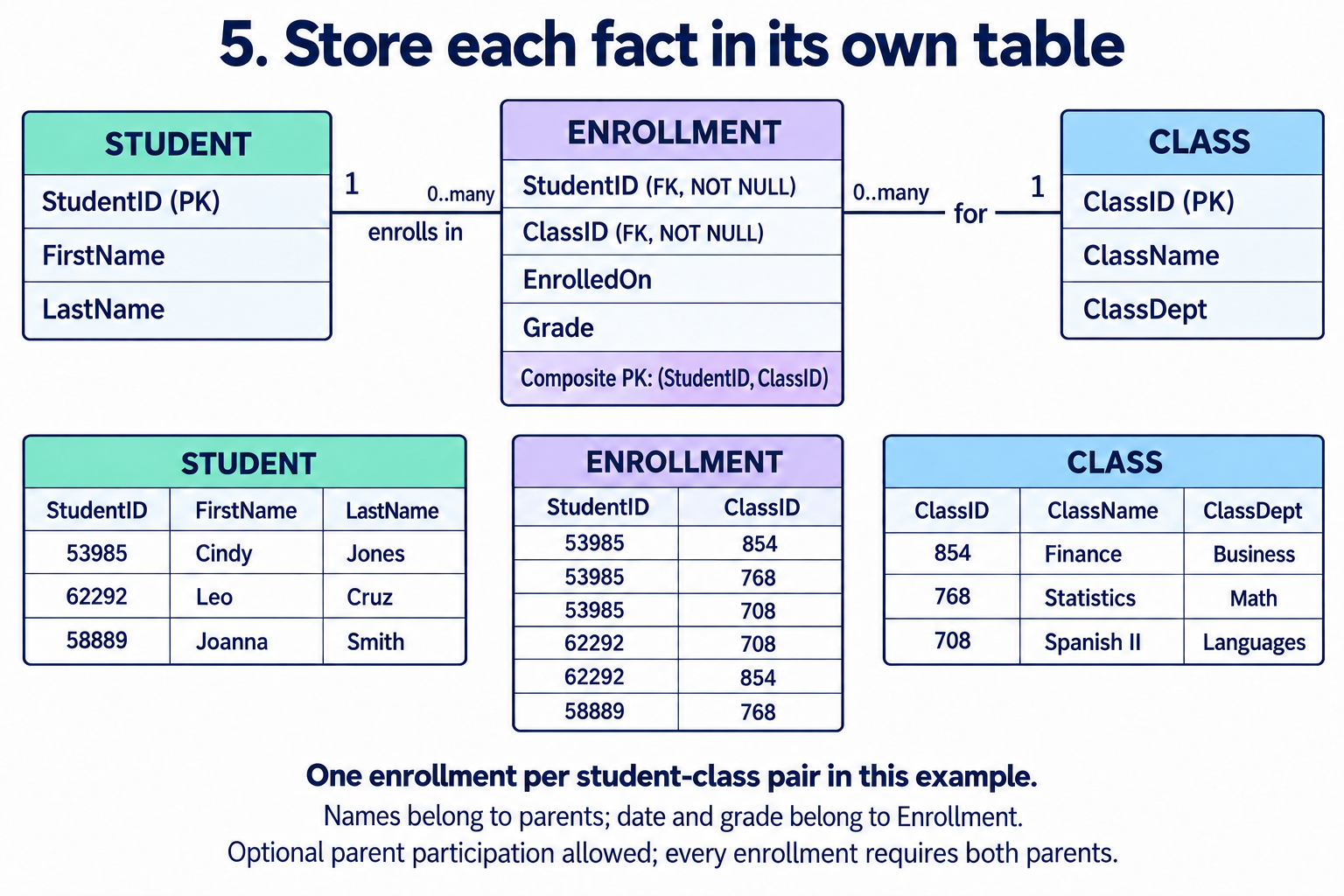
Store Cindy's name once in Student and Finance's name once in Class. Record each pair once in Enrollment. A join can reconstruct the flattened report without repeating parent facts in the enrollment storage.
CREATE TABLE Student (
  StudentID INT NOT NULL PRIMARY KEY,
  FirstName VARCHAR(50) NOT NULL,
  LastName VARCHAR(50) NOT NULL
);

CREATE TABLE Class (
  ClassID INT NOT NULL PRIMARY KEY,
  ClassName VARCHAR(100) NOT NULL,
  ClassDept VARCHAR(100)
);

CREATE TABLE Enrollment (
  StudentID INT NOT NULL,
  ClassID INT NOT NULL,
  EnrolledOn DATE NOT NULL,
  Grade VARCHAR(5),
  CONSTRAINT pk_enrollment PRIMARY KEY (StudentID, ClassID),
  CONSTRAINT fk_enrollment_student
    FOREIGN KEY (StudentID) REFERENCES Student(StudentID),
  CONSTRAINT fk_enrollment_class
    FOREIGN KEY (ClassID) REFERENCES Class(ClassID)
);
Supply identifiers explicitly and create the referenced students and classes before inserting enrollments. Grade may be null until assessment is complete. Its eventual values should follow the institution's grading rules.
| StudentID | ClassID | Association |
|---|---|---|
| 53985 | 854 | Cindy in Finance |
| 53985 | 768 | Cindy in Statistics |
| 53985 | 708 | Cindy in Spanish II |
| 62292 | 708 | Leo in Spanish II |
| 62292 | 854 | Leo in Finance |
| 58889 | 768 | Joanna in Statistics |
StudentID 53985 repeats, and ClassID 854 repeats, but no pair repeats. Attempting to insert (53985, 854) again would violate the composite primary key. An enrollment with an unknown student or class would violate a foreign key. A student or class without enrollments is still allowed; non-null junction references do not require a row for every parent.
Here, ClassID identifies a specific offering. If a catalog course is taught in multiple terms or sections, identify each offering separately. If multiple attempts within the same offering must be retained, revise the enrollment key or introduce an attempt/history model. A surrogate EnrollmentID does not resolve that business question by itself.
Degree and Cardinality Answer Different Questions
Degree counts the participating entity roles: a binary relationship has two roles, and a ternary relationship has three. Cardinality describes permitted numbers of related instances. Student/Class is a binary M:N association even though its implementation includes a third table.
A recursive relationship may use two roles of the same entity type, such as Employee mentors Employee. A ternary association such as Supplier supplies Product to Project may need a table referencing all three entities. Replacing it with independent pairwise associations can lose which supplier supplied which product to which project; analyze the business meaning before decomposing it.
Association Attributes Belong to the Right Pair
EnrolledOn belongs to one Student/Class association. Grade must also identify the class in which it was earned. Putting one grade in Student would not distinguish Cindy's three classes; putting it in Class would not distinguish Cindy from Leo in Finance.
The same principle applies to Quantity on an order item and HoursWorked on an employee/project assignment. Attribute placement helps explain why the association has its own row, while the permitted maximums establish its cardinality.
For a second visual example, see Lesson 8's OrderItem junction diagram. For employee assignments, review the Employee/Project example in Lesson 2.
Quick Self-Check: Is the Relationship M:N?
- May one A relate to several B instances?
- May one B relate to several A instances?
- What is the permitted minimum on each side?
- What does one association row represent, and may the same pair occur again?
Both maximums must permit many for M:N. Relationship attributes, plural wording, and repeated data are prompts to investigate; none substitutes for those two confirmed maximums.
Additional Business Examples
- Order and Product: An item stores the product quantity and possibly the price agreed for that order.
- Employee and Project: An assignment stores the employee's role or hours for that project.
- Author and Publication: Authorship may store author sequence or contribution details when co-authorship is allowed.
Identify M:N by testing both directions, then define the association's row and key. The next lesson explores problems caused by poorly represented many-to-many associations.