| Lesson 13 | Optional Participation in Relationships |
| Objective | Explain and implement optional participation in table relationships. |
Optional Participation in Database Relationships
Optional participation means that an entity instance may have zero related instances. It describes the minimum, independently of whether the maximum is one or many. Write the rule in both directions before deciding how to store the relationship.
Two common patterns are an employee who may have no department assignment and a student who may have no course enrollments. The first uses a nullable foreign key. The second uses the absence of association rows, while keeping the keys in each existing association required.
Read Optionality in Both Directions
| Starting instance | Related instances allowed | Implementation |
|---|---|---|
| Employee | Zero or one department | Nullable DepartmentID foreign key |
| Department | Zero or many employees | No employee rows required |
| Student | Zero or many courses | Zero or many Enrollment rows |
| Course | Zero or many students | Zero or many Enrollment rows |
Numeric labels near an entity tell you how many instances of that entity can relate to one instance at the other end. Thus 0..1 near Department means zero or one department per employee. In Crow's Foot notation, a circle represents a minimum of zero; read it together with the maximum symbol.
These are explicit business assumptions. If every employee must have a department, that reference becomes required. A department having no employees is a separate rule and does not determine whether an employee's foreign key can be NULL.
Two Ways to Represent an Absent Relationship
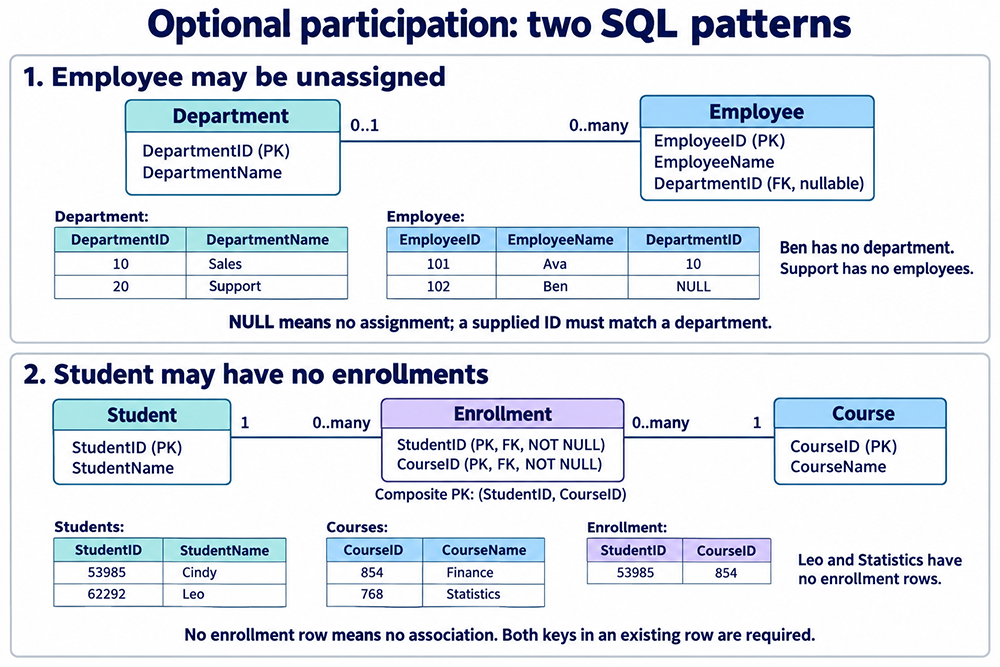
Department and Employee: A Nullable Foreign Key
Each employee belongs to at most one department in this model, and an employee may be entered before assignment. Department rows can also exist before employees are assigned.
CREATE TABLE Department (
    DepartmentID INT NOT NULL PRIMARY KEY,
    DepartmentName VARCHAR(100) NOT NULL
);

CREATE TABLE Employee (
    EmployeeID INT NOT NULL PRIMARY KEY,
    EmployeeName VARCHAR(100) NOT NULL,
    DepartmentID INT,
    CONSTRAINT fk_employee_department
        FOREIGN KEY (DepartmentID) REFERENCES Department(DepartmentID)
);

INSERT INTO Department (DepartmentID, DepartmentName) VALUES
    (10, 'Sales'), (20, 'Support');

INSERT INTO Employee (EmployeeID, EmployeeName, DepartmentID) VALUES
    (101, 'Ava', 10), (102, 'Ben', NULL);
DepartmentID is nullable because the column has no NOT NULL constraint. NULL means no recorded department assignment in this example. A supplied value such as 10 must still match an existing department. A value of 999 is rejected if department 999 does not exist.
Do not use zero or an invented department row merely to avoid NULL. Define a real placeholder entity only when the business has a meaningful entity of that kind. Do not add UNIQUE to Employee.DepartmentID: several employees may share the same department.
Student and Course: No Enrollment Row
Student and Course can exist independently. Enrollment represents the association. Here CourseID identifies one scheduled offering, and each student may enroll at most once in that offering. If you distinguish a course catalog from term-specific offerings or repeated attempts, introduce those identities and adjust the association key accordingly.
CREATE TABLE Student (
    StudentID INT NOT NULL PRIMARY KEY,
    StudentName VARCHAR(100) NOT NULL
);

CREATE TABLE Course (
    CourseID INT NOT NULL PRIMARY KEY,
    CourseName VARCHAR(100) NOT NULL
);

CREATE TABLE Enrollment (
    StudentID INT NOT NULL,
    CourseID INT NOT NULL,
    CONSTRAINT pk_enrollment PRIMARY KEY (StudentID, CourseID),
    CONSTRAINT fk_enrollment_student
        FOREIGN KEY (StudentID) REFERENCES Student(StudentID),
    CONSTRAINT fk_enrollment_course
        FOREIGN KEY (CourseID) REFERENCES Course(CourseID)
);

INSERT INTO Student (StudentID, StudentName) VALUES
    (53985, 'Cindy'), (62292, 'Leo');

INSERT INTO Course (CourseID, CourseName) VALUES
    (854, 'Finance'), (768, 'Statistics');

INSERT INTO Enrollment (StudentID, CourseID)
VALUES (53985, 854);
Cindy takes Finance. Leo has no enrollments; Statistics has no students. All are valid under the optional-participation rules. This uses familiar student and subject identifiers from the preceding lessons, with a smaller example and simplified parent attributes.
An Enrollment row always needs both members. A row with NULL CourseID is not how we record Leo's lack of enrollments. The pair key rejects a duplicate enrollment, while allowing a student in another course or another student in the same course.
Query Entities That Have No Related Rows
Include Unassigned Employees
SELECT e.EmployeeName, d.DepartmentName
FROM Employee AS e
LEFT JOIN Department AS d
    ON d.DepartmentID = e.DepartmentID
ORDER BY e.EmployeeID;
The result includes Ava with Sales and Ben with a NULL DepartmentName. An INNER JOIN would omit Ben. Use WHERE e.DepartmentID IS NULL to select unassigned employees; = NULL is not the appropriate test.
Find Students with No Enrollments
SELECT s.StudentID, s.StudentName
FROM Student AS s
WHERE NOT EXISTS (
    SELECT 1
    FROM Enrollment AS e
    WHERE e.StudentID = s.StudentID
)
ORDER BY s.StudentID;
This returns Leo. The same pattern can find courses with no students by matching Enrollment.CourseID to Course.CourseID.
Count Employees, Including Empty Departments
SELECT d.DepartmentID, d.DepartmentName,
       COUNT(e.EmployeeID) AS EmployeeCount
FROM Department AS d
LEFT JOIN Employee AS e
    ON e.DepartmentID = d.DepartmentID
GROUP BY d.DepartmentID, d.DepartmentName
ORDER BY d.DepartmentID;
Sales has one employee and Support has zero. Count the child's non-null key, rather than COUNT(*), because a LEFT JOIN produces an unmatched result row for an empty department. Group by the identifier as well as the name so different departments with the same name remain distinct.
Deletion and Minimum Participation Are Separate Decisions
The examples specify no cascading action. With foreign-key enforcement enabled, deleting Sales while Ava references it is rejected. A nullable foreign key permits an absent assignment; it does not automatically erase an assignment when its parent is deleted.
If the business permits automatic unassignment, an engine-supported ON DELETE SET NULL action can clear Employee.DepartmentID when its department is deleted. Choose this only when losing that assignment is acceptable. For historical personnel records, reassignment, deactivation or a separate assignment-history design may be more appropriate.
Deleting Cindy's enrollment leaves her Student row and Finance's Course row. Under the stated optional rules, that is allowed. Required foreign keys validate existing associations; they do not require every student or course to have an association.
If a later rule says every active student must have an enrollment, define when “active” begins and enforce the transition and later edits transactionally. A simple row-level CHECK does not generally count related rows. Periodic reports detect violations but do not prevent them, and concurrency must be considered in any enforcing workflow.
Design Checklist
- State the minimum and maximum in both directions.
- Use a nullable child foreign key only when that child may lack its parent assignment.
- Represent optional participation in a many-to-many relationship with zero association rows.
- Keep both parent references required in every complete association row.
- Choose deletion policies explicitly, and confirm that constraints are enabled.
- Review indexes against your engine and queries; foreign keys do not universally create child indexes automatically.
Common Pitfalls
- Confusing the two directions: a department may have zero employees even when every employee must have a department.
- Using nullable association keys: an optional enrollment is an absent row, while an existing enrollment identifies both members.
- Filtering away unmatched rows: placing a condition on the joined department in WHERE can remove unassigned employees from a LEFT JOIN result. Decide whether the condition belongs in ON or WHERE according to the intended result.
- Assuming names are identifiers: use a justified key. Department, student and course names are not necessarily unique.
Check Your Understanding
- Can Ben be inserted without an assignment? Yes: DepartmentID may be NULL.
- Can Ava reference department 999 when it does not exist? No: the foreign key still applies to a supplied reference.
- Must Support already have an employee? No: the minimum is zero.
- Can Leo exist without an Enrollment row? Yes. Can a complete Enrollment row omit CourseID? No.
Continue with the Mandatory and Optional Participation exercise.
Glossary
- Optional participation: A minimum of zero related instances.
- Mandatory participation: A minimum of one related instance.
- Nullable foreign key: A reference column that may contain NULL; supplied values are checked against the referenced key.
- Associative table: A table whose rows represent associations between parent entities.