| Lesson 3 | Types of Relationships |
| Objective | Describe and implement the three relationship types (1:1, 1:N, M:N) with correct cardinality and participation. |
Three Relationship Types in ER Modeling
The three fundamental relationship types in database design are one-to-one (1:1), one-to-many (1:N), and many-to-many (M:N). They describe how many instances of one entity may be associated with an instance of another. Many-to-one (N:1) is the same relationship as one-to-many, read from the opposite direction. This lesson therefore includes four illustrations but teaches three fundamental patterns.
For example, a department can employ several people, while each employee belongs to one department under a particular business rule. Reading from Department to Employee gives a one-to-many relationship. Reading from Employee to Department gives a many-to-one relationship. The underlying association and its database implementation do not change when you reverse the reading direction.
An entity-relationship diagram begins with the rules of the system being modeled. An entity type, such as Employee, describes a category of things. An entity instance is one particular employee. In a relational implementation, entity types commonly become tables, instances become rows, and identifiers become keys. A primary key (PK) identifies a row uniquely; a foreign key (FK) connects a row to an existing referenced row.
| Pattern | Example | Implementation |
|---|---|---|
| 1:1 | Person and current Passport | A unique foreign key or a shared primary key |
| 1:N | Department has Employees | A foreign key in Employee |
| N:1 | Employee belongs to Department | The same foreign key, viewed in reverse |
| M:N | Student enrolls in Course | An Enrollment junction table with two foreign keys |
Cardinality and Participation: How Many, and Must There Be Any?
A relationship needs both a maximum and a minimum. The cardinality ratio summarizes the maximum number of related instances: one or many. Participation states whether an instance must participate in the relationship or may exist without a related instance. A one-to-many relationship does not, by itself, say whether a department may have no employees.
Ask two questions in each direction: how many employees may one department have, and how many departments may one employee have? Then ask whether zero is allowed on each side. For this lesson's department example, a department may have zero or many employees, but every employee must belong to exactly one department. Those are separate rules, and both must be represented.
| Multiplicity | Meaning |
|---|---|
0..1 | Zero or one related instance: optional, with a maximum of one. |
1 or 1..1 | Exactly one related instance: mandatory. |
0..* | Zero or many related instances: optional. |
1..* | One or more related instances: at least one is required. |
The figures below use 0..N and 0..M informally to mean zero or many. In UML multiplicity notation, 0..* expresses an unbounded upper limit. The labels near an entity describe how many instances of that entity can relate to one instance at the opposite end. Thus, 1 near Department means one department per employee, while 0..N near Employee means zero or many employees per department.
These figures use explicit labels to explain the rules. They are not a complete specification of one formal drawing notation. In particular, 1..* describes one association end; it is not a complete substitute for the two-sided ratio 1:N. Read both ends before deciding what a diagram allows.
One-to-One: Person and Current Passport
A one-to-one relationship permits at most one related instance in either direction. In this example, the application stores at most one current passport record per person. A person may have no passport record, but each stored passport must belong to exactly one person. This is a rule for the example system, not a universal claim about passports, citizenship, or renewal history.
Database Design for Mere Mortals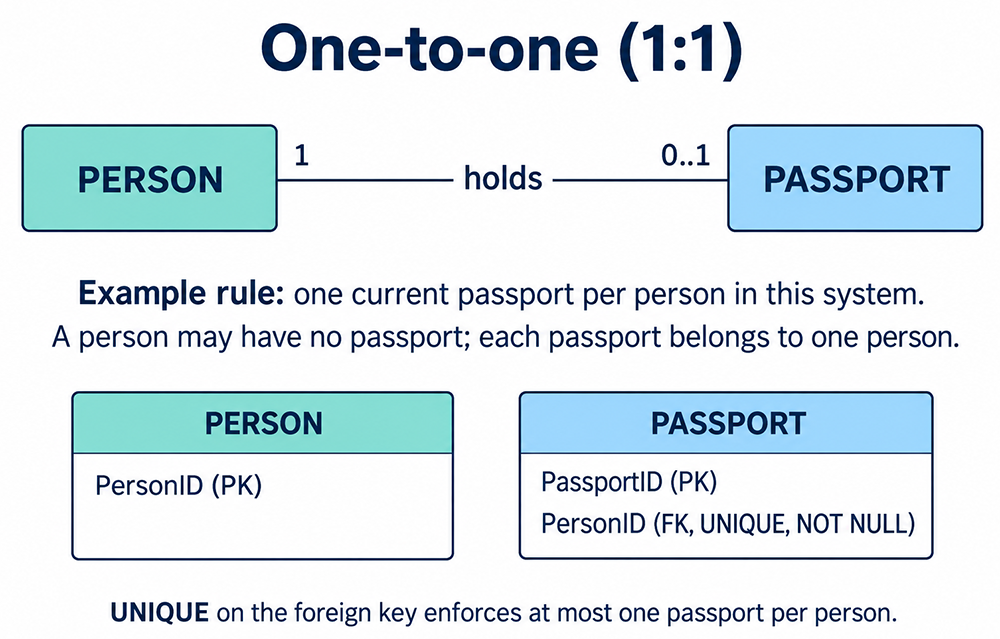
Passport.PersonID is a foreign key with
UNIQUE and NOT NULL constraints.The following SQL defines the key structure. The identifiers are supplied by the application or by inserts; automatic number generation is omitted so that the relationship constraints remain the focus.
CREATE TABLE Person (
    PersonID INTEGER PRIMARY KEY
);

CREATE TABLE Passport (
    PassportID INTEGER PRIMARY KEY,
    PersonID INTEGER NOT NULL,
    CONSTRAINT uq_passport_person UNIQUE (PersonID),
    CONSTRAINT fk_passport_person
        FOREIGN KEY (PersonID) REFERENCES Person (PersonID)
);
Each constraint contributes something different. The foreign key requires an existing person. NOT NULL prevents a
passport record without a person identifier. UNIQUE prevents two passport rows from referencing the same person.
Without the unique constraint, several passport records could reference one person, producing a one-to-many structure instead.
For example, after creating person 101, you may create a passport for person 101. A second passport row with a different PassportID but the same PersonID would violate the unique constraint. Person 102 can still exist without a passport row, because none of these constraints requires every person to have a passport.
An alternative is a shared primary key: the dependent table uses PersonID as both its primary key and its foreign key. This also permits at most one dependent row per person. Choosing separate tables can be useful when the dependent information has a different lifecycle, access policy, or availability. If no meaningful distinction exists, consider whether a single table better expresses the entities. Do not split tables solely to create a one-to-one relationship.
One-to-Many: Department and Employee
In a one-to-many relationship, one parent can be associated with several children, while each child is associated with at most one parent in that relationship. Here, the business rule makes the employee's participation mandatory: every employee belongs to exactly one department. A department may exist before anyone is assigned to it.
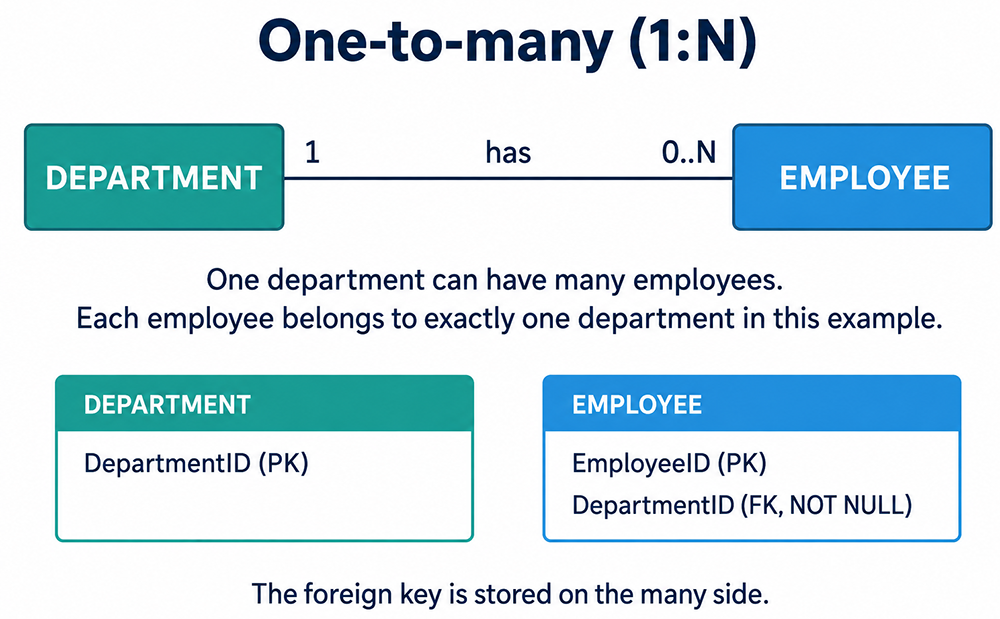
DepartmentID in Employee, on the many side.CREATE TABLE Department (
DepartmentID INTEGER PRIMARY KEY
);
CREATE TABLE Employee (
EmployeeID INTEGER PRIMARY KEY,
DepartmentID INTEGER NOT NULL,
CONSTRAINT fk_employee_department
FOREIGN KEY (DepartmentID) REFERENCES Department (DepartmentID)
);Employee rows 201, 202, and 203 can all contain DepartmentID 10. Their employee identifiers are different, but the department identifier repeats because they belong to the same department. This repetition is intentional. Do not declare Employee.DepartmentID unique unless the actual business rule permits no more than one employee per department.
The foreign key also prevents assigning an employee to a department identifier that does not exist. The department row must be available when the constraint is checked. To retrieve the associated rows, join Employee.DepartmentID to Department.DepartmentID. A join reads the relationship; the foreign key protects the validity of the stored references.
If employees may temporarily be unassigned, DepartmentID could allow NULL. That would change the employee-to-department multiplicity to zero or one and require changing the diagram accordingly. Conversely, requiring every department to have at least one employee is a separate parent-side rule. The child-side NOT NULL foreign key does not enforce it. Such a requirement needs additional implementation planning appropriate to the database and transaction workflow.
Many-to-One: Reading the Same Relationship in Reverse
From an employee's perspective, the preceding association is many-to-one. Many employee instances may refer to one department, but each individual employee refers to exactly one department in this example. The direction of your question changes the description, not the table design.
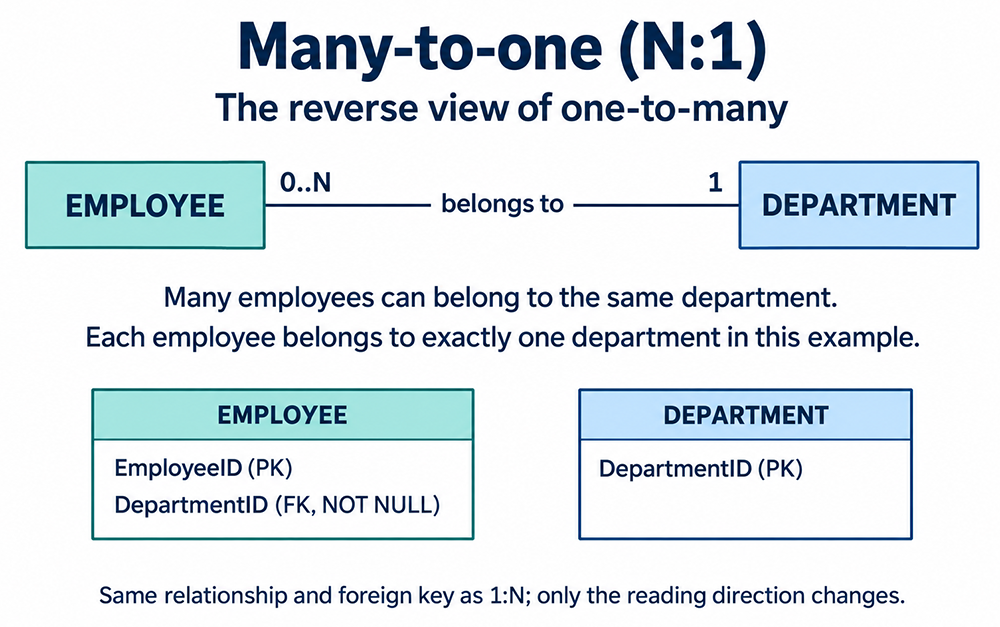
Employee.DepartmentID foreign key implements both descriptions.Use the wording that fits the task. A department directory asks, "Which employees belong to this department?" An employee profile asks, "Which department does this employee belong to?" Both queries use the same association. Do not add a second foreign key or another table simply because a requirement describes the relationship in reverse.
Many-to-Many: Student and Course
A many-to-many relationship permits multiple related instances in both directions. A student may enroll in several courses, and a course may have several students. In the illustrated model, either may exist without any enrollments. The relationship itself has meaning: an enrollment records one student's association with one course.
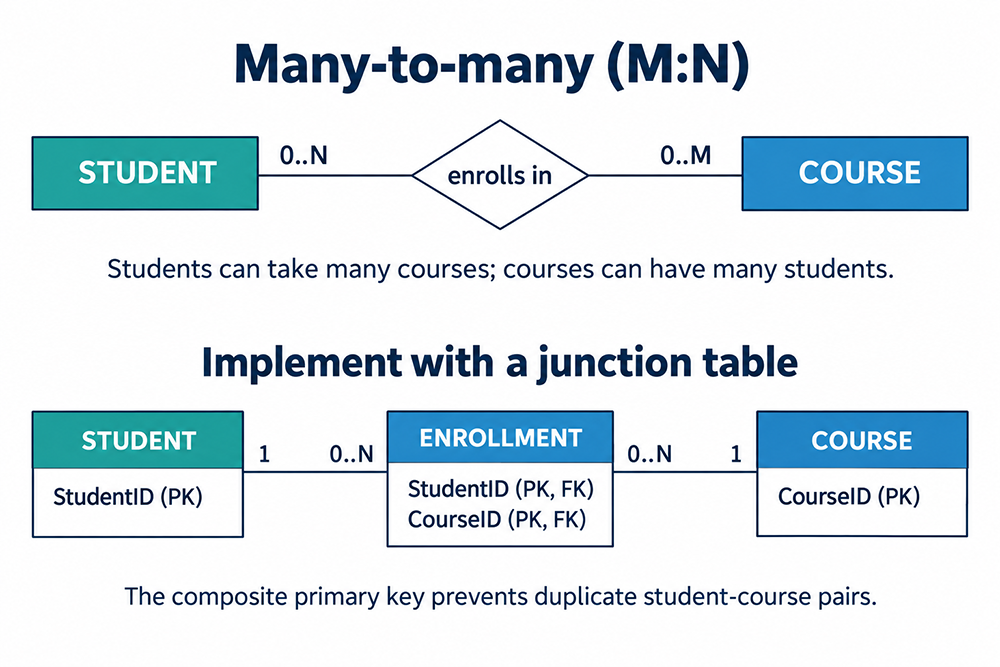
In a conventional normalized relational schema, implement this association with an associative table, also called a junction table or bridge table. Student has a one-to-many relationship with Enrollment, and Course has another one-to-many relationship with Enrollment. The conceptual student-course relationship remains many-to-many.
CREATE TABLE Student (
    StudentID INTEGER PRIMARY KEY
);

CREATE TABLE Course (
    CourseID INTEGER PRIMARY KEY
);

CREATE TABLE Enrollment (
    StudentID INTEGER NOT NULL,
    CourseID INTEGER NOT NULL,
    CONSTRAINT pk_enrollment PRIMARY KEY (StudentID, CourseID),
    CONSTRAINT fk_enrollment_student
        FOREIGN KEY (StudentID) REFERENCES Student (StudentID),
    CONSTRAINT fk_enrollment_course
        FOREIGN KEY (CourseID) REFERENCES Course (CourseID)
);
The pair, rather than either column alone, identifies an enrollment. Rows (101, 10), (101, 20), and (102, 10) are distinct: student 101 takes two courses, and course 10 has two students. Inserting (101, 10) again violates the primary key. The two PK labels in the figure identify components of one composite primary key, not two independent primary keys.
A relationship attribute, such as EnrollmentDate or Grade, belongs in Enrollment when it describes a particular student-course association. Storing Grade in Student would not distinguish the student's courses; storing it in Course would not distinguish the course's students. This is one reason that resolving a many-to-many relationship improves the structure of the model.
If an EnrollmentID surrogate primary key is introduced, retain a unique constraint on the student-course pair when duplicates remain forbidden. If repeat enrollments or academic terms are required, revise the business key, for example by referencing a course offering instead of only a course. Always define what one row represents before choosing its key.
Choosing the Relationship from Business Rules
Determine cardinality from what the system must allow, not merely from the rows currently present. A department with one employee today does not establish a one-to-one relationship. If it can recruit another employee tomorrow, the permitted maximum is many. Similarly, a student taking one course this term does not make the student-course model one-to-many.
Write each relationship in both directions and test a few boundary cases. Can either entity exist first? Can the reference be missing? Can multiple rows share the same reference? Can the same pair occur again? These questions reveal optional participation, uniqueness requirements, and whether an association needs its own attributes or identity.
Also identify the scope of the rule. An employee assigned to one home department may still participate in several projects. Those are different relationships with different cardinalities. A system that allows multiple departmental appointments would need a different employee-department model, potentially with an assignment table. Entity names alone do not determine the answer.
Validate the Model with Small Examples
Before loading a full dataset, describe a few operations that should succeed and a few that should fail. Start with valid parent records, then consider the dependent records. This makes the difference between a missing parent, an optional relationship, and a duplicate association easier to see. It also gives you concrete cases to discuss with the people who own the business rules.
For Person and Passport, creating a person without a passport should succeed. Creating a passport that references an existing person should succeed. Creating another passport for that same person should fail under this example's current-record rule. Creating a passport with no PersonID should fail for a different reason: the relationship is mandatory from Passport to Person.
For Department and Employee, create two departments and assign three employees to the first one. The empty second department is valid, and the repeated DepartmentID in the three employee rows is valid. An employee referencing an unknown department should fail. These cases show that the foreign key restricts which identifier values are permitted without restricting a department to one employee.
For Enrollment, associate one student with two courses and a second student with one of those courses. All three pairs should be accepted when the referenced students and courses exist. Repeating an existing pair should fail. Removing one enrollment should not require removing the student or the course: the association has its own row, separate from the entities it connects.
These are expected outcomes of the shown constraints, not a substitute for testing your chosen database implementation. If a stakeholder expects a different outcome, revisit the business rule before changing a constraint merely to make an insert work.
How Relationship Design Supports Normalization
Relationship modeling and normalization address complementary questions. Relationship modeling identifies which things are associated and how many associations are allowed. Normalization examines dependencies among attributes so that facts are stored in appropriate places. A diagram's cardinality labels alone do not establish that every table is normalized.
For example, adding DepartmentName to every Employee row repeats a department fact across employees. Keeping that name in Department allows employees to reference the department's identifier. Similarly, Enrollment stores the student-course association, while student details remain in Student and course details remain in Course. This division makes it easier to change an entity's details without updating every association involving that entity.
Common Implementation Mistakes
- Confusing a foreign key with uniqueness. A foreign key validates references; it does not prevent several child rows from referencing the same parent. Add uniqueness only when the relationship requires it.
- Putting the reference on the wrong side. A single EmployeeID in Department cannot represent all employees in the illustrated model. DepartmentID belongs in Employee.
- Using repeating columns or lists. CourseID1, CourseID2, and comma-separated course identifiers impose awkward limits and complicate integrity checks. Represent each enrollment as a row.
- Assuming mandatory participation works both ways. Requiring a department for every employee does not require an employee for every department. Document and implement each direction separately.
- Using performance choices to define the model. Indexes can help joins and constraint operations, but an index is not a substitute for the intended foreign-key and uniqueness constraints. Indexing decisions depend on the DBMS and workload.
Plan deletion behavior separately as well. Removing a department does not automatically mean its employees should be deleted. Decide whether the operation should be rejected, preceded by reassignment, or handled by another explicitly defined business process. Choose referential actions to match that decision rather than adding cascading deletes by habit.
Check Your Understanding
- Can a department with no employees exist in the pictured model? Yes. The employee multiplicity is zero or many. The Employee foreign key does not require a child row for every department.
- What prevents two passport records from referencing the same person? The UNIQUE constraint on Passport.PersonID. Its foreign key and NOT NULL constraint separately require an existing person.
- What prevents duplicate student-course pairs? The composite primary key on Enrollment(StudentID, CourseID). Either identifier may repeat, but their combination may not.
Related Lessons
The same business rules can be expressed in different diagramming conventions. Continue with Chen, Crow's Foot, and IDEF1X notation to compare their symbols, or review relationship types in Microsoft Access for another implementation setting.
Next, examine one-to-one relationships in greater detail, including how business rules determine whether separate related tables are appropriate.
Binary relationship: A relationship with two participating entity roles, such as Department and Employee. The examples here use two different entity types; a recursive binary relationship can involve two roles of the same entity type.