| Lesson 2 | The Entity-Relationship (ER) Diagram |
| Objective | Explain the role and function of an ER diagram in data modeling. |
What Is an Entity Relationship Diagram (ERD)?
An entity relationship diagram (ERD) is a visual model of the things a system stores data about, their attributes, and the relationships between them. Its purpose is to make business rules explicit before those rules are implemented as database tables and constraints. For example, an ERD can show that each order belongs to one customer and that a customer may place many orders.
- Agree on the rules: use entity names and relationship statements that stakeholders can explain and verify.
- Plan the schema: identify attributes, keys, and relationships before writing table definitions.
- Document decisions: keep the diagram aligned with the implemented schema and revised requirements.
A Simple ER Diagram Example: Customers and Orders
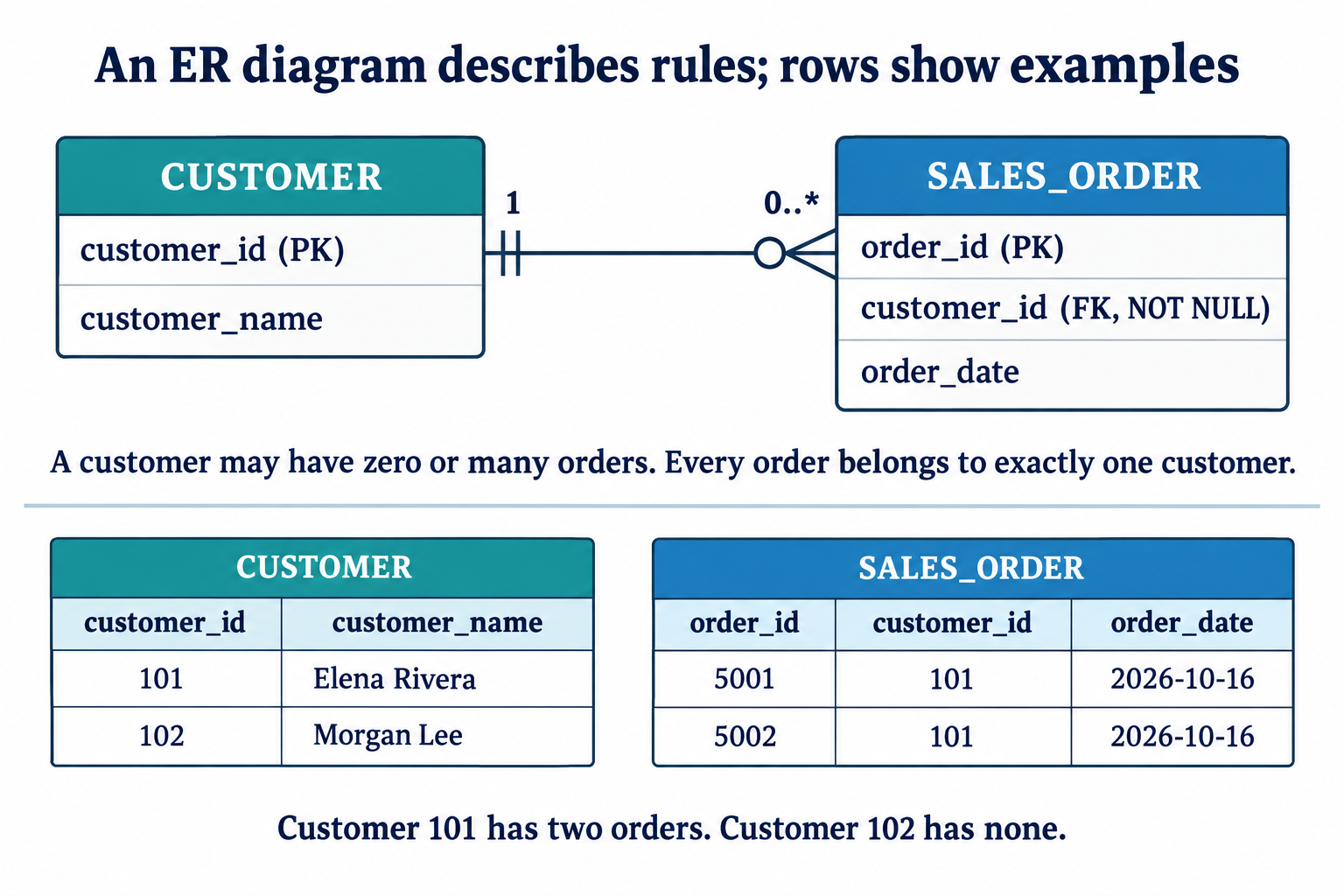
CUSTOMER ||----------o{ SALES_ORDERIn this Crow's Foot text sketch, || means exactly one and o{ means zero or many. Read the markers beside the entity being counted:
- For one customer, count orders at the SALES_ORDER end: zero, one, or many.
- For one order, count customers at the CUSTOMER end: exactly one.
A logical model can give CUSTOMER a customer_id primary key and SALES_ORDER an order_id primary key plus a customer_id foreign key. The foreign-key constraint requires a matching customer; NOT NULL requires a customer_id value. Together they require every order to identify an existing customer. It does not require every customer to have an order.
See the Crow's Foot symbols and endpoint combinations and the entity, attribute and key conventions for the next level of detail.
Conceptual, Logical and Physical ER Diagrams
A conceptual ERD captures business entities and relationships. A logical ERD adds attributes, identifiers and relationship rules. A physical model maps these decisions to a particular database, including tables, column types and constraints. The detail shown depends on the modeling level and notation.
Entity Types, Instances, and Business Rules
An entity type describes a category, such as CUSTOMER. An instance is one member, such as customer 101. The collection of instances at a particular time is the entity set. In a relational implementation, a row represents an instance and columns store its attributes.
The example includes two orders for customer 101 and none for customer 102. It satisfies the stated 1:N rule, but two sample orders do not set a maximum of two. Requirements establish the allowed counts; the diagram records them.
Read a relationship in both directions and separate maximum cardinality from minimum participation. The same 1:N relationship could require at least one order per customer under a different business rule. That stronger requirement is not enforced merely by adding NOT NULL to the child foreign key.
A reviewed diagram guides the relational schema and SQL[1] constraints. Drawing the diagram does not create or enforce those constraints. Diagramming tools may generate some implementation code, but the resulting rules still need verification.
Value Sets (Domains) of Attributes
Each simple attribute has a value set (or domain) that specifies its permissible values. A domain combines a data type with any justified business restrictions. For example, customer_name needs a character type that supports the people represented, including spaces, punctuation and accented characters. An order date should use an appropriate date representation; any rule about permitted dates must come from the application requirements, not from the attribute name alone.
Value sets are usually expressed using standard programming language types (integer, string, Boolean, float, enumerated types, subranges) or database-specific types such as date and time. Conceptual diagrams may omit these details; logical or physical models can show them. Domains help define which stored values are valid.
Optional Advanced Topic: Attribute Value Sets
For a required, single-valued attribute, a simple mathematical model is A : E → V: each entity has one value in the domain. More generally, an attribute A of entity set E with value set V can be represented as a function from E to the power set [2] of V:
A : E → P(V)
For an entity e, this set-valued representation permits zero, one, or several values. An empty set means no values in this mathematical model; SQL NULL is a separate marker for missing or unknown information and is not an empty set. For a single-valued composite attribute [3] whose components have domains V1 through Vn, use the Cartesian product:
V = V1 × V2 × ... × Vn
A multivalued composite attribute can instead map to P(V). Although these sets describe the full potential range of attribute values, the actual database will only hold values that correspond to the current state of the modeled domain (the "miniworld").
The next lesson compares Crow's Foot, Chen and IDEF1X notation. These are notation families, distinct from conceptual, logical, and physical levels of detail.