| Lesson 13 | Concatenated Primary Keys |
| Objective | Define concatenated primary keys and explain when to use them. |
What Is a Concatenated Key? Composite Key Examples
A concatenated primary key, also called a composite primary key, is a primary key made up of two or more columns in the same table. Instead of relying on a single column to uniquely identify each row, the database uses the combination of values across several columns as the key.
Recall that a primary key must uniquely identify every row and must never contain NULL values. In
many tables a single column - OrderNo, CustomerID, or a system-generated
integer - is sufficient. However, there are important cases where no single column can guarantee
uniqueness. In those situations, a concatenated primary key is one appropriate design choice; a surrogate key plus a UNIQUE constraint on the business key is another.
Concatenated does not mean joining text. Declare the columns together with PRIMARY KEY (OrderNo, CDNo); do not use CONCAT(). For example, joining the digits in pairs (1, 23) and (12, 3) would produce the same text, 123, even though the pairs differ.
When a Single Column Is Not Enough
Consider a Line Item table that records the individual items on each customer order for Stories on CD:
| Line Item | ||||||
| OrderNo | CDNo | Quantity | SellingPrice | Discount | LineCost | Shipped |
In the Line Item table, OrderNo identifies the customer order and CDNo
identifies the product being sold. Neither column alone can uniquely identify a row:
- An order can contain multiple CDs, so the same
OrderNovalue appears on several rows - one for each item on that order. - The same CD can appear on many different orders, so the same
CDNovalue appears on rows for different orders.
Because both columns contain duplicate values, neither column alone can serve as the primary key.
The key must treat OrderNo and CDNo as a pair.
Defining a Concatenated Primary Key
For this example, the business rule permits one row per CD per order. The pair (OrderNo, CDNo) identifies that row; Quantity records multiple units. If a product may occupy separate lines on the same order, use a line identifier such as (OrderNo, LineNo) instead.
In an enrollment table, (StudentID, CourseID) works when each course ID identifies a particular offering and each student enrolls in that offering at most once. If the table tracks repeated attempts, the key must also distinguish the relevant offering or attempt.
Creating a Concatenated Primary Key in SQL
The Line Item table definition below uses a concatenated primary key declared with the
CONSTRAINT syntax:
CREATE TABLE LineItem (
    OrderNo      INTEGER        NOT NULL,
    CDNo         INTEGER        NOT NULL,
    Quantity     INTEGER        NOT NULL,
    SellingPrice NUMERIC(8,2)   NOT NULL,
    Discount     NUMERIC(5,2),
    LineCost     NUMERIC(8,2),
    Shipped      CHAR(1)        NOT NULL,
    CONSTRAINT pk_lineitem PRIMARY KEY (OrderNo, CDNo)
);
The PRIMARY KEY (OrderNo, CDNo) constraint instructs the RDBMS to enforce two rules:
- The pair
(OrderNo, CDNo)must be unique across all rows in the table. - Neither
OrderNonorCDNomay contain a NULL value.
These are the same requirements as a single-column primary key - uniqueness and non-nullability - applied across the combination of columns rather than a single column.
The Order Items Example: Combining Two Columns
The order items table in Figure 2-1 below provides the original course example of a concatenated primary key. Because there is more than one item on a single order, and because the same item can appear on more than one order, order numbers repeat and item numbers repeat. Neither column alone can serve as the primary key.
The combination (OrderNo, CDNo) is unique under the stated rule. Adding Quantity to the key would weaken that rule: two rows could then have the same order and CD but different quantities. Keep Quantity outside the key.
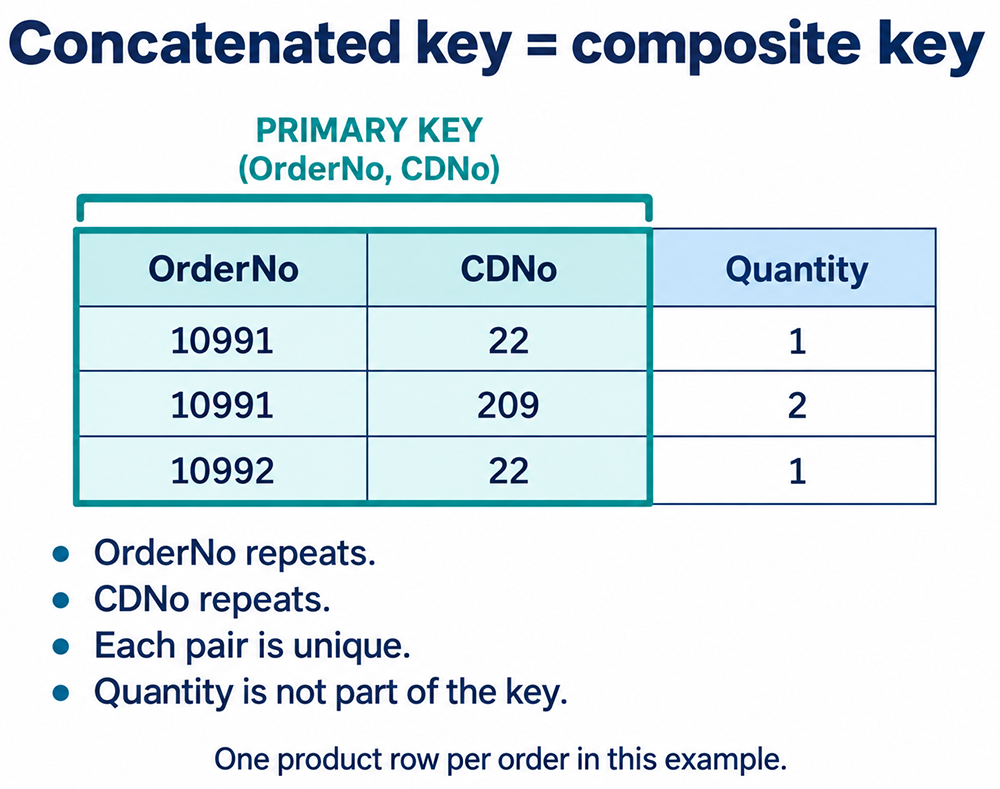
This example establishes two additional properties of a well-designed primary key:
- A candidate key is minimal: removing any of its columns would lose uniqueness under the business rules. Minimal does not mean choosing the fewest columns among all possible candidate keys.
- Prefer stable identifiers. Natural or surrogate identifiers can work; assess the actual business rules and references.
Design Rules for Concatenated Primary Keys
Four rules govern the design of a concatenated primary key:
- Exclude unnecessary columns. The order/CD pair must remain unique. Quantity describes the line and does not belong in its identifier.
- Prefer stable, meaningless identifiers. The columns in a primary key - concatenated or not - should be stable over time and should not encode business meaning that might change. Names, addresses, and phone numbers are meaningful data that users update in the normal course of business. They are poor choices for primary key columns.
- Avoid data that end users edit in normal business operations. If a column's value is expected to change - a product description, a customer name, a status code - that column should not participate in the primary key. A key change may be blocked by referencing constraints or require coordinated updates, depending on the DBMS and declared referential actions.
- Ensure the combination is unique and never NULL. The combined values across all key columns must uniquely identify each row, and none of the key columns may contain NULL. The RDBMS enforces both rules through the PRIMARY KEY constraint.
In many modern database designs a surrogate key - an auto-incrementing integer or a GUID generated
by the system - serves as the primary key for most tables. Even in those designs, concatenated
keys remain common in intersection tables that resolve many-to-many relationships. A
StudentCourse table with (StudentID, CourseID) as its primary key, or an
OrderLine table with (OrderNo, CDNo), are typical examples.
The StudentCourse Intersection Table
The StudentCourse diagram below illustrates the concatenated primary key concept in the context of a many-to-many relationship between students and courses:
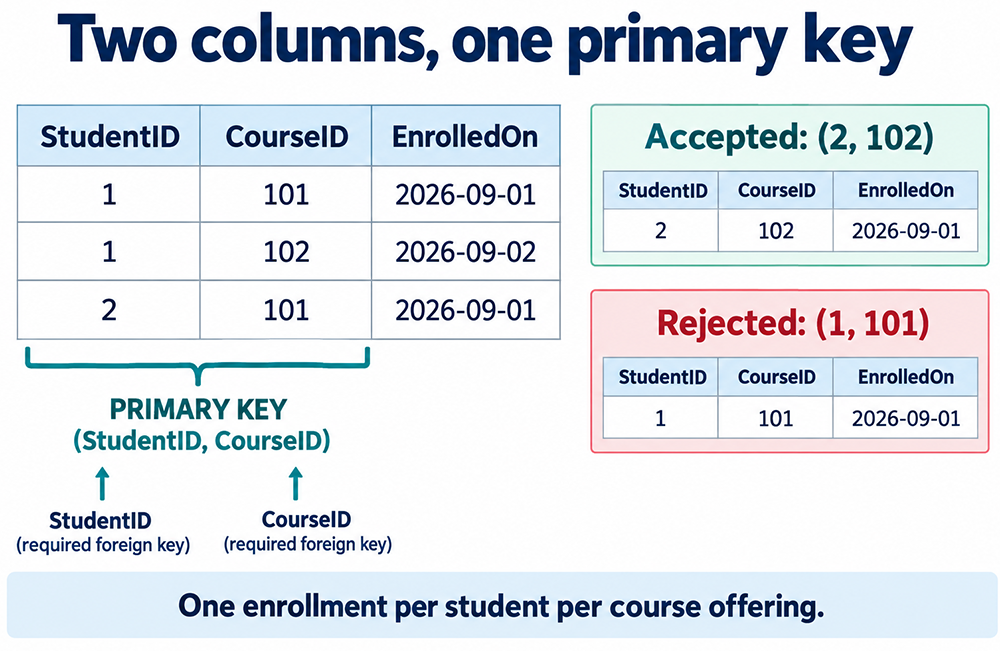
A surrogate enrollment ID is an alternative, but retain UNIQUE (StudentID, CourseID) and NOT NULL on both columns to enforce the same business rule. The LineItem SQL above demonstrates the primary key only; a complete schema also needs foreign keys to its order and product tables.
Relations, Attributes, and Tuples
The practical rules covered in this lesson rest on the formal language of relational theory. In that theory, a table is called a relation[2], a column is called an attribute, and a row is called a tuple.
A tuple supplies one value for each named attribute. Relational meaning does not depend on a physical column position. A two-attribute relation contains pairs; a three-attribute relation contains triples.
In pure relational theory, relations impose no inherent ordering on rows or columns. The order in
which rows are stored or retrieved, and the order in which columns are defined, are both considered
semantically irrelevant. In practice, database applications return rows in a predictable order
controlled by an ORDER BY clause, and present columns in the order specified by the SELECT list.
The key point for this lesson: a concatenated primary key is still a primary key on a relation. It uniquely identifies tuples in that relation just as a single-column primary key does. The relational model places no restriction on the number of attributes that may participate in the primary key.
Summary: When to Use a Concatenated Primary Key
Use a concatenated primary key when:
- No single column can uniquely identify each row.
- The combination of several existing columns is unique and will remain stable over time.
- You want to avoid embedding meaningful, user-editable data in the primary key.
- You are modeling an intersection table in a many-to-many relationship, such as
OrderLine(OrderNo, CDNo)orStudentCourse(StudentID, CourseID).
As you design each table, verify that the key - single-column or concatenated - enforces the business rule that each row represents one and only one entity instance, and that the database can enforce that rule without relying on application code.
The next lesson describes all-key relations[1].
Primary Key - Quiz
Before moving on, click the Quiz link below to check your understanding of key columns and primary
keys:
Primary Key - Quiz