| Lesson 3 | Types of joins: 1) inner join |
| Objective | Define an inner join. |
SQL Inner Joins
An SQL Inner Join is a fundamental operation that combines rows from two or more tables based on a related column between them, returning only the records where there is a match in both tables. It works by specifying the join condition in the ON clause, typically using equality between primary and foreign keys, and effectively filters out unmatched rows from the result set. This type of join is essential for querying normalized databases to reconstruct meaningful data relationships without including extraneous or orphaned records.
What Is an Inner Join?
An inner join is the most common type of SQL join. It returns only those rows where the join condition is true in both tables. If no match exists, that pair of rows is excluded from the result.
You use inner joins whenever you want to combine rows from two or more normalized tables—for example, to show which employee works in which department, or which distributor supplies a specific CD.
You use inner joins whenever you want to combine rows from two or more normalized tables—for example, to show which employee works in which department, or which distributor supplies a specific CD.
Inner Join Example (Employees and Departments)
Consider the following simplified tables:
employees
+------+----------+-------------+
| id   | name     | department  |
+------+----------+-------------+
| 1    | John     | HR          |
| 2    | Alice    | IT          |
| 3    | Bob      | HR          |
| 4    | Sarah    | Sales       |
+------+----------+-------------+

departments
+----+------------+
| id | name       |
+----+------------+
| 1  | HR         |
| 2  | IT         |
| 3  | Marketing  |
+----+------------+
To list each employee together with that employee’s department name, you can use an inner join:
SELECT e.name      AS employee_name,
       d.name      AS department_name
FROM   employees   AS e
JOIN   departments AS d
  ON   e.department = d.name;
This query returns only rows with matches in both tables:
+---------------+-----------------+
| employee_name | department_name |
+---------------+-----------------+
| John          | HR              |
| Alice         | IT              |
| Bob           | HR              |
+---------------+-----------------+
Notice that there is no result row for Sarah in Sales because there is no matching Sales row in the
departments table. Inner joins always return only matching pairs.
Equi-Joins and Natural Joins
In practice, you will often create joins whenever records from two tables are frequently combined to answer a business question. When the join condition tests for
If each table has a column with the same name and compatible data type, some systems also support natural joins, where the join automatically uses columns with identical names. Although natural joins can be convenient, most modern SQL development favors explicit
The remainder of this lesson focuses on the inner join using the course project’s
= (equality) between two columns, the join is called an equi-join. Many inner joins are equi-joins.
If each table has a column with the same name and compatible data type, some systems also support natural joins, where the join automatically uses columns with identical names. Although natural joins can be convenient, most modern SQL development favors explicit
JOIN ... ON ... syntax because it is clearer and easier to maintain.
The remainder of this lesson focuses on the inner join using the course project’s
CD and DISTRIBUTOR tables. Later lessons will introduce same-table joins, outer joins, and Cartesian products.
Inner Join Example (CD and DISTRIBUTOR)
In the previous lesson, you saw a join between the CD and DISTRIBUTOR tables based on the shared
DistID column. The result is a virtual table that exists only in memory for the duration of the query, but it behaves like a single table that combines information from both sources.
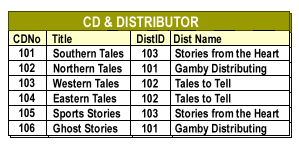
| CDNo | Title | DistID | Dist Name |
|---|---|---|---|
| 101 | Southern Tales | 103 | Stories from the Heart |
| 102 | Northern Tales | 101 | Gamby Distributing |
| 103 | Western Tales | 102 | Tales to Tell |
| 104 | Eastern Tales | 102 | Tales to Tell |
| 105 | Sports Stories | 103 | Stories from the Heart |
| 106 | Ghost Stories | 101 | Gamby Distributing |
This virtual table shows the result of joining the
CD and DISTRIBUTOR tables on matching DistID values.
This is an example of an inner join on
DistID. The best way to define it is to show the SQL statement that produces the rows in the virtual table:
SELECT  c.CDNo,
        c.Title,
        c.DistID,
        d.DistName
FROM    CD          AS c
JOIN    DISTRIBUTOR AS d
   ON   c.DistID = d.DistID;
This course focuses on the aspects of SQL that are essential for understanding joins. For more extensive coverage of SQL syntax, query tuning, and modern database features, see the
Sitemap for related courses.
This join is an inner join because it produces rows only when a value in
Use an inner join whenever you need to combine rows from more than one table, but only for records that share matching key values. In the CD and distributor example, the inner join creates result rows that list:
CD.DistID matches a value in DISTRIBUTOR.DistID. Any CD row whose DistID does not reference an existing distributor is excluded from the result set.
Use an inner join whenever you need to combine rows from more than one table, but only for records that share matching key values. In the CD and distributor example, the inner join creates result rows that list:
- The CD’s number,
- The CD title,
- The distributor’s ID code, and
- The distributor’s name.
[1]inner join: A link between tables in a database that returns only those rows where the join condition is true in both tables.
[2]same-table join: A type of inner join in which a table is logically duplicated and then joined to itself, matching rows that share equivalent values in designated columns.
[3]outer join: A link between tables in a database that returns matching rows plus rows from one table that have no match in the other, filling missing values with
NULLs.[4]Cartesian product: A join that combines every row in one table with every row in another table; primarily useful for testing or as an intermediate step when building more complex queries.