| Lesson 5 | Constraints and Keys |
| Objective | Describe common mistakes associated with constraints and keys in relational databases. |
Common Mistakes with Constraints and Keys
Constraints and keys are what actually make relational database integrity real, rather than aspirational. A well-designed database enforces its business rules at the schema level itself — not just hoped for in application code, but structurally guaranteed by the database engine on every insert and update, regardless of what's doing the inserting. When constraints are poorly defined or keys are misused, the result isn't a minor inconvenience — it's data anomalies, duplicate records, and referential integrity that quietly breaks down over time. This lesson works through the mistakes that cause that breakdown, and how to avoid them.
1. Mistakes with Constraints
Constraints define the rules limiting what data can actually be inserted or updated in a column — valid ranges, uniqueness, required relationships. One of the most common sources of error isn't a missing constraint at all, but a mistyped one that silently enforces the wrong rule.
Say you want to guarantee that an order's total cost falls between $1 and $500:
Constraint mistakes aren't limited to typos, either. A common gap is relying entirely on application-level validation — checks written into a Java service or an API — while leaving the schema itself defenseless. That works fine until someone runs a manual script directly against the database, or a second application connects to the same tables without going through your validation layer.
A related, quieter mistake: skipping
Say you want to guarantee that an order's total cost falls between $1 and $500:
CHECK (OrderCost >= 1 AND OrderCost <= 500)
CHECK (OrderCost < 1 AND OrderCost < 500)
OrderCost < 1 — since anything satisfying the stricter "less than 1" condition automatically satisfies "less than 500" too, the second half of the constraint does nothing. The database now only accepts orders under a dollar, making it functionally impossible to insert a single valid order. The constraint doesn't throw an error announcing it's wrong; it just silently rejects everything real, which is exactly what makes this kind of mistake so easy to miss until orders start failing in production. Always verify a constraint's logic against representative real data, not just against the business rule you think you wrote.
Constraint mistakes aren't limited to typos, either. A common gap is relying entirely on application-level validation — checks written into a Java service or an API — while leaving the schema itself defenseless. That works fine until someone runs a manual script directly against the database, or a second application connects to the same tables without going through your validation layer.
CHECK, NOT NULL, and UNIQUE constraints enforced at the database level guarantee integrity across every access path, not just the one you happened to write validation for.
NOT NULL gets misused in both directions. Underusing it — allowing NULL where a value should really be required or defaulted — produces sparse data and forces every query touching that column to account for missing values. Overusing it, by marking every column NOT NULL without providing sensible DEFAULT values, causes inserts to fail constantly whenever genuinely optional data is left out. Neither extreme is the goal; the goal is matching each column's constraint to whether that data is actually always required.
A related, quieter mistake: skipping
CHECK constraints on simple status or state fields. Without one, a column meant to hold a small set of valid states ends up polluted with inconsistent variations — 'In Progress', 'in-progress', 'Processing' — all meaning the same thing to a human, all different values to every query and report that has to match against them.
2. Not Planning for Change
Good database design anticipates growth and flexibility. An overly rigid design makes future changes painful, particularly when constraints or table structures never accounted for the exceptions that real business processes always seem to have. During requirements gathering, listen specifically for words like "sometimes," "except," or "unless" — they're a reliable signal that a rigid, one-size-fits-all structure won't hold up.
A concrete example: a customer describes their process as "each order form must have a billing and shipping address — unless it's a split order." That single "unless" tells you two fixed address fields on the order table won't be enough. The address data belongs in a separate
A concrete example: a customer describes their process as "each order form must have a billing and shipping address — unless it's a split order." That single "unless" tells you two fixed address fields on the order table won't be enough. The address data belongs in a separate
Addresses table instead, related to orders one-to-many, so a split order can have as many addresses as it actually needs without the schema fighting the requirement.
3. Real-World Example: Youth Soccer Database
Consider a small application built to manage a youth soccer league. Figure 1 shows a relational model that enforces data integrity through deliberate use of primary and foreign keys: every player belongs to one or more games, and every parent record corresponds back to a specific player.
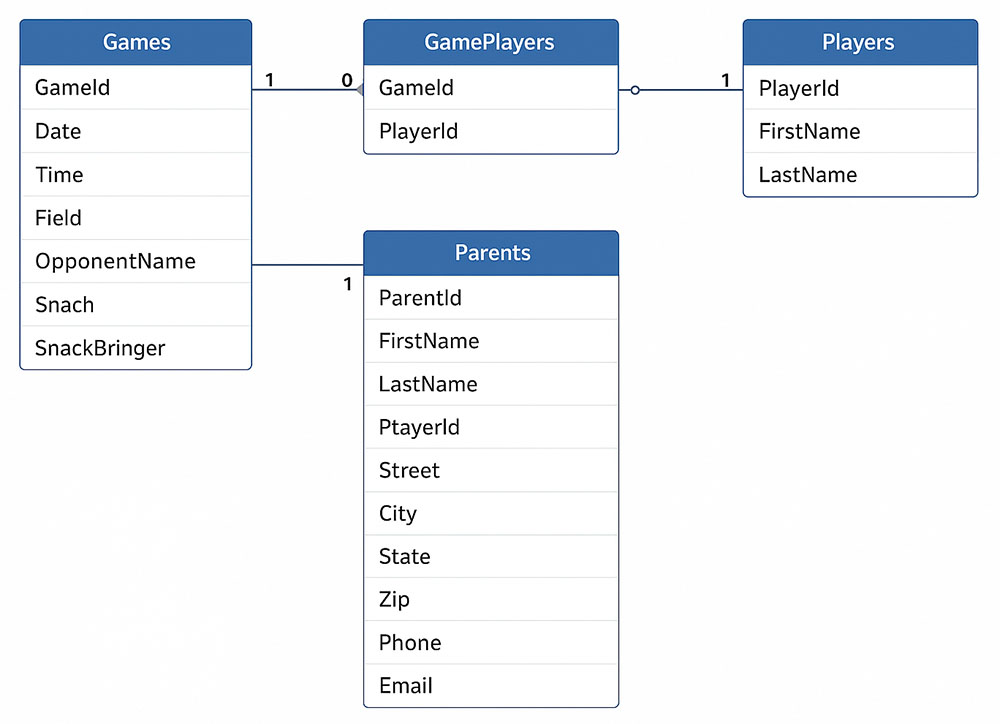
- Games — contains details such as date, time, field, opponent, coach, and snack bringer.
- GamePlayers — a linking (junction) table establishing a many-to-many (M:N) relationship between Games and Players.
- Players — lists individual player details with a unique
PlayerId. - Parents — stores contact and address information for each player's parent or guardian, related through
PlayerId.
SnackBringer.
This schema also hints at where key design commonly goes wrong. A junction table like
One more thing worth knowing, particularly if you're working in Oracle specifically: defining a primary key almost always creates its supporting index automatically, but defining a foreign key doesn't universally guarantee the same — Oracle Database, notably, does not index foreign key columns by default. An unindexed foreign key can mean a full table scan every time that relationship is joined or a parent record is deleted, which is easy to miss until the table grows large enough for it to hurt.
These key-specific pitfalls get their full treatment in the next lesson; the point here is just to notice that a schema's constraints and its key choices are two sides of the same integrity problem, not separate concerns.
GamePlayers is exactly where a composite primary key belongs — but the same technique applied to a primary entity table like Players itself would be a mistake, forcing every related table to carry multiple redundant columns just to reference one player. It's also worth being deliberate about what a table's primary key actually is: a real-world attribute like a phone number or email address might feel like a natural fit, but natural values change, and every change has to cascade through every table that references it as a foreign key. A surrogate key like PlayerId — a simple, immutable identifier with no real-world meaning of its own — sidesteps that problem entirely, which is exactly why this schema uses one.
One more thing worth knowing, particularly if you're working in Oracle specifically: defining a primary key almost always creates its supporting index automatically, but defining a foreign key doesn't universally guarantee the same — Oracle Database, notably, does not index foreign key columns by default. An unindexed foreign key can mean a full table scan every time that relationship is joined or a parent record is deleted, which is easy to miss until the table grows large enough for it to hurt.
These key-specific pitfalls get their full treatment in the next lesson; the point here is just to notice that a schema's constraints and its key choices are two sides of the same integrity problem, not separate concerns.
4. Balancing Integrity and Flexibility
Constraints and keys exist to maintain order, but too many rigid rules make a system brittle instead of trustworthy. The goal is balance: enforce what genuinely must never change, and leave deliberate room for everything else to evolve. A foreign key that should naturally follow its parent's changes is a good candidate for
Thoughtful design lets the database enforce correctness automatically, while still adapting smoothly as requirements change — without forcing a major schema overhaul every time something new comes up.
The next lesson explores common mistakes with primary and foreign keys specifically, and their impact on referential integrity.
ON UPDATE CASCADE; NOT NULL and UNIQUE constraints belong only where the business truly requires them, not applied reflexively to every column.
Thoughtful design lets the database enforce correctness automatically, while still adapting smoothly as requirements change — without forcing a major schema overhaul every time something new comes up.
The next lesson explores common mistakes with primary and foreign keys specifically, and their impact on referential integrity.