| Lesson 2 | Database Life Cycle |
| Objective | Describe where we are in the database life cycle. |
Database Life Cycle: Five Stages and Their Deliverables
The Database Life Cycle (DBLC) is the sequence of stages a database passes through from initial conception through active use and eventual retirement. Understanding where a given design task falls within the DBLC helps database designers make decisions appropriate to that stage and avoid premature implementation of details that belong to a later phase.
This course groups the database life cycle into five stages. Other methodologies separate planning, conceptual design, testing, deployment, or retirement into additional phases; there is no universal stage count.
- Requirements Analysis
- Logical Design
- Physical Design
- Implementation
- Monitoring, Modification, and Maintenance
In the first stage, Requirements Analysis, you determine what data the database will need to hold and what tasks it will need to perform to meet the needs of its users. This stage produces two categories of output:
- Business objects - the things in the business environment that need to be represented in the database, such as customers, products, orders, and employees.
- Business rules - the restrictions on how users perceive and interact with data, such as "an order must belong to exactly one customer" or "a product price cannot be negative."
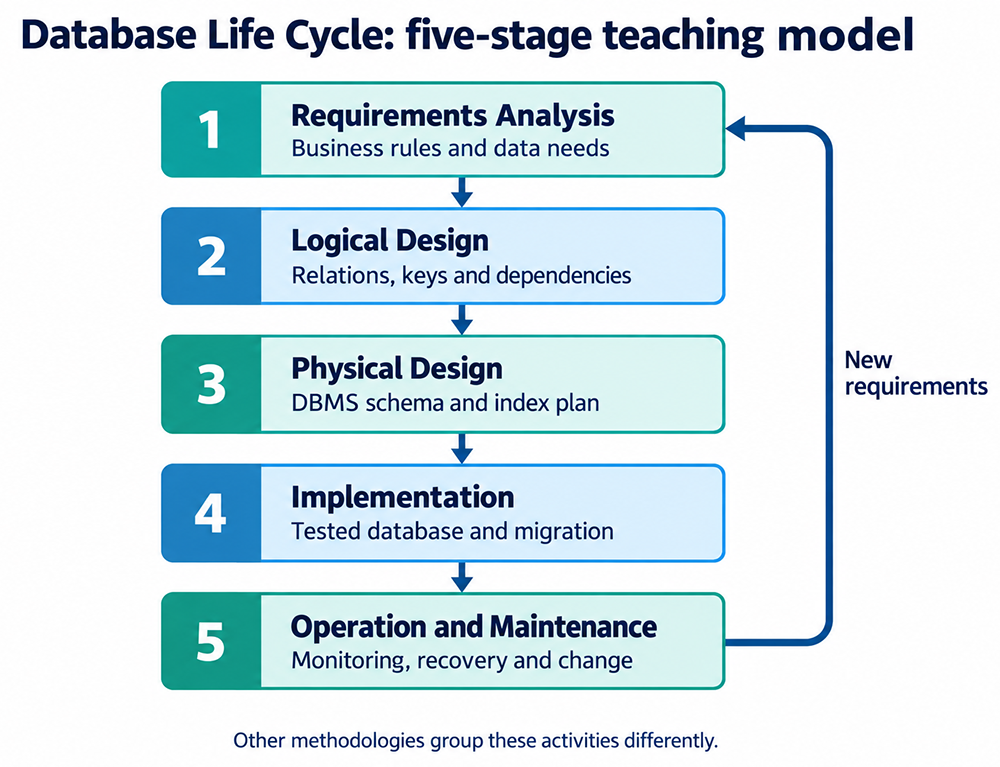
| Stage | Main question | Deliverable |
|---|---|---|
| 1. Requirements analysis | What must the database support? | Business rules, data needs, transaction and reporting requirements |
| 2. Logical design | How should the data relate? | Relations, keys, constraints, and dependency analysis |
| 3. Physical design | How will the chosen DBMS implement it? | DBMS schema, indexes, storage and access plan |
| 4. Implementation | Does the working database meet the requirements? | Created and tested database, migration and deployment procedures |
| 5. Operation and maintenance | Does it remain reliable as needs change? | Monitoring, recovery tests, tuning and controlled changes |
Example: For a course enrollment system, requirements establish whether students may repeat a course. Logical design selects the enrollment key; physical design selects indexes for the expected queries. Implementation loads and tests the data. Maintenance checks performance and adapts the schema when enrollment rules change.
The Five DBLC Stages in Detail
Each stage of the DBLC has a distinct focus and produces specific deliverables that feed into the next stage. Understanding the boundary between stages prevents common design errors such as making physical implementation decisions during the logical design phase.
Stage 1 - Requirements Analysis is the foundation of the entire database. During this stage the designer works with users and stakeholders to identify the business objects that need to be stored, the business rules that govern the data, and the queries and reports the database must support. The output of this stage is a conceptual understanding of the data requirements - not yet a formal data model.
Stage 2 - Logical Design translates requirements into entities, attributes, relationships, and then relational schemas. Normalization uses dependencies to reduce avoidable redundancy and update anomalies. The logical model defines keys and constraints without committing to DBMS-specific storage structures; normalization alone does not guarantee query performance.
Stage 3 - Physical Design translates the logical model into a physical schema suited to the target DBMS. This stage addresses storage structures, index design, access paths, and DBMS-specific features such as tablespaces, partitioning, and storage parameters. The physical design is where DBMS differences become relevant - a design optimized for Oracle will differ from one optimized for SQL Server or PostgreSQL.
Stage 4 - Implementation converts the physical design into a working database. Tables, indexes, and constraints are created using DDL statements. Data is loaded from existing sources or entered through application interfaces. User accounts and access permissions are established. The database is tested against the original requirements to verify that it supports all required queries and transactions.
Stage 5 - Monitoring, Modification, and Maintenance covers the operational life of the database. Performance is monitored and tuned as usage patterns emerge. Schema changes are made as business requirements evolve. Backups are scheduled and tested. The database is periodically reviewed to ensure it continues to meet user needs and performs within acceptable parameters.
Where This Course Fits in the DBLC
The first course in this series covered Requirements Analysis and the first phase of Logical Design through the creation of the ER diagram. This course picks up at the next phase of the Logical Design stage: normalizing the base tables you created in the ER diagram so that information can be stored and retrieved efficiently.
In the first phase of the Logical Design stage you converted business objects and their characteristics into entities[1] and attributes[2]. You then created an entity-relationship (ER) diagram[3] that graphically represents as base tables the entities, their attributes, and the relationships[4] that exist between them. The next phase is to normalize[5] those base tables.
The Dual Meaning of Database Table
During design, a table schema describes the proposed attributes and constraints. During implementation, CREATE TABLE establishes that structure in the DBMS. An ERD may show conceptual entities or logical table schemas, depending on its level of detail.
A base table is a table whose data is stored independently of a query-defined view. Calling an ERD entity a base table is shorthand for its intended relational implementation, not a requirement that every entity maps to exactly one table.
Base Tables in Entity-Relationship Diagrams
Logical table schemas become base tables during implementation. Mapping depends on the business rules: many-to-many relationships need an associative table, and some attributes or entity hierarchies need additional tables.
In an ERD, the mapping from design to implementation follows three rules:
- Entities such as
Customer,Order, andProductare each mapped to a base table during database design. - Each attribute of an entity becomes a column in the corresponding base table.
- Primary keys and foreign keys defined in the ERD are enforced as constraints in the base tables.
Not all tables in a relational database originate from a single entity in the ERD. The following table compares base tables, common base-table roles, and views:
| Table Type | Description |
|---|---|
| Base Table | Stores actual data derived from entities or relationships in the ERD |
| Ordinary View | A stored query definition that presents a table-like result; an ordinary view does not separately store its result rows |
| Intersection Table | A base table created to resolve a many-to-many relationship between two entities |
| Lookup Table | A base table used for validation or reference values such as
Country or Status |
Consider this ERD fragment as an example. An Employee entity has attributes
EmployeeID, Name, and HireDate. A WorksIn
relationship connects Employee to Department. The Employee entity maps
directly to the following base table:
CREATE TABLE Employee (
  EmployeeID INT PRIMARY KEY,
  Name       VARCHAR(100),
  HireDate   DATE
);
The Employee table is a base table derived from the Employee entity. If the
WorksIn relationship is many-to-many - meaning one employee can work in multiple
departments and one department can contain multiple employees - a second base table called
EmployeeDepartment is created to resolve the relationship.
Purpose and Function of a Database Table
A database table is the core structural component for storing and organizing data in a relational database. Conceptually, a table resembles a matrix or spreadsheet in which each row represents a unique instance of an entity and each column defines a specific type of data with a predefined data type and associated constraints.
Database tables serve four core functions:
- Data Storage - a table stores persistent data representing real-world entities such as customers, products, and transactions. This data survives application restarts and is available to any authorized user or process.
- Data Organization - tables organize data into structured formats that simplify processing and reduce redundancy. Related data is grouped into the same table; unrelated data is separated into different tables linked by keys.
- Querying and Manipulation - tables are designed to support efficient SQL
operations including
SELECT,INSERT,UPDATE, andDELETE. The structure of the table determines how efficiently these operations execute. - Relational Integrity - tables are linked through primary keys and foreign keys, enabling complex relationships across entities to be expressed and enforced at the database level.
Database tables are governed by constraints that ensure consistency and accuracy across all operations:
- Primary Key - uniquely identifies each record in the table.
- Foreign Key - links one table to another, enforcing referential integrity.
- NOT NULL - ensures that a column cannot store a null value.
- UNIQUE - prevents duplicate values in a specified column.
- CHECK - validates that column values meet a specified condition.
Tables form the foundation of the relational model. Each table represents a relation. Normalization analyzes dependencies to reduce avoidable redundancy and update anomalies. Set-based operations such as joins allow data from multiple tables to be combined and filtered efficiently. A database table is not merely a container for data - it is a relational construct designed to support efficient storage, logical access patterns, robust integrity constraints, and complex entity relationships.
The DBLC Across Different DBMS Platforms
The activities recur across DBMS platforms, but their grouping and sequence vary by methodology. Oracle, SQL Server, and PostgreSQL have different implementation details; they do not impose a single universal five-stage development process.
Some practitioners extend the DBLC to seven stages to capture the full operational lifecycle more explicitly:
- Planning and Requirements Analysis - defining the database's purpose, identifying user and stakeholder requirements, and creating a conceptual data model.
- Design - refining the conceptual model into a logical data model, then translating it into a physical schema for the target DBMS.
- Implementation - creating tables, indexes, and constraints, and loading data into the database.
- Testing - verifying that the database meets its requirements and performs as expected under realistic load conditions.
- Deployment - releasing the database to production and making it available to users.
- Maintenance and Evolution - performing ongoing backups, performance tuning, and schema modifications as business requirements change.
- Retirement and Replacement - decommissioning the database when it reaches the end of its useful life and migrating to a replacement system.
Choose modeling, migration, monitoring, and backup tools appropriate to the target DBMS. Test recovery procedures as well as successful inserts and queries. In iterative development, these activities repeat as requirements evolve.
Database life cycle vs. systems development life cycle
The DBLC focuses on the database and its data. The broader systems development life cycle also covers application interfaces, services, and other system components. Their requirements, testing, and deployment activities must be coordinated.
For another grouping of the activities, compare MariaDB's six-stage database lifecycle.
Glossary
The next lesson introduces tables, describing their role in relational theory.