| Lesson 6 | One-to-many relationships |
| Objective | Define and model one-to-many (1:N) relationships. |
One-to-Many Relationship: ER Diagram and SQL Example
- For one instance of Entity A, there can be zero, one, or many instances of Entity B.
- For one instance of Entity B, there can be at most one instance of Entity A.
Think in terms of tables: one row in Table A can relate to many rows in Table B, while each row in Table B relates back to at most one row in Table A. Business rules determine whether that parent is required or optional.
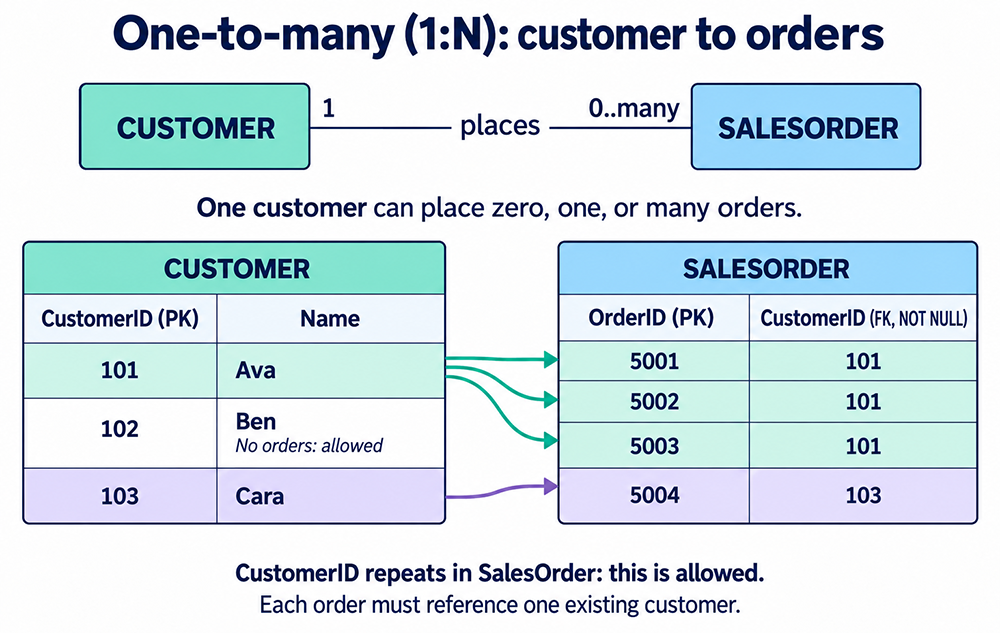
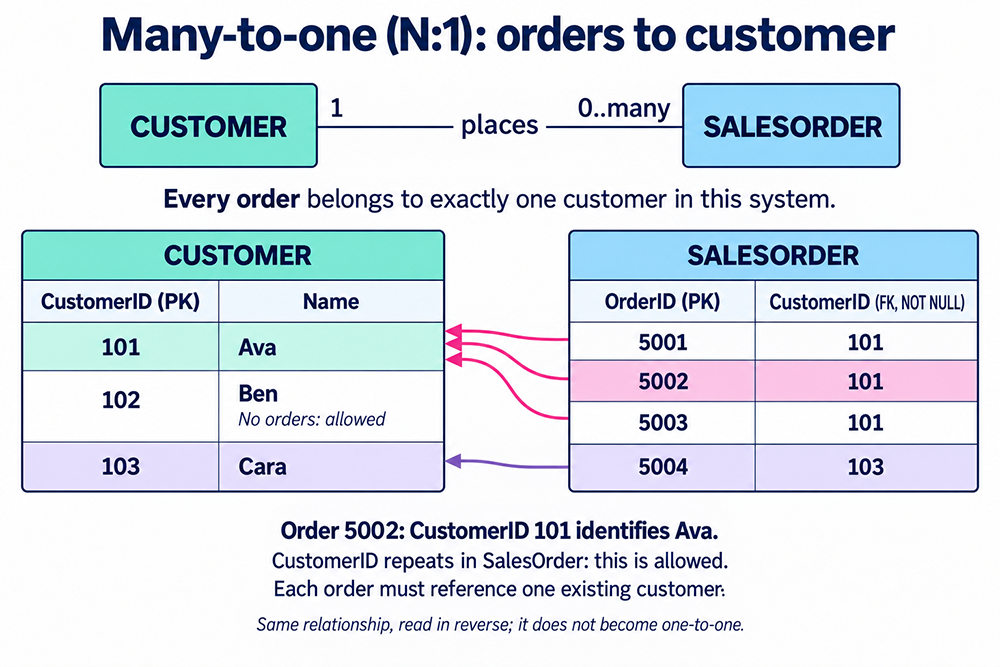
One-to-Many ER Diagram Example: Customer and Orders
Suppose customer 101 (Ava) has orders 5001, 5002 and 5003, customer 102 (Ben) has no orders yet, and customer 103 (Cara) has order 5004. The relationship is one-to-many because several orders can reference the same customer. In this example, every order must reference exactly one customer.
Customer (one) ||----------o{ SalesOrder (zero or many)
This text sketch represents Crow's Foot endpoints: || means exactly one, and o{ means zero or many. Read it in both directions: one customer can have zero or many orders; one order belongs to exactly one customer. See the Crow's Foot symbols and reading rules.
One-to-Many vs. Many-to-One
These describe the same relationship from opposite directions. Customer to SalesOrder is 1:N; SalesOrder to Customer is N:1. It does not become one-to-one when read from an individual order. A one-to-one relationship also limits each customer to at most one related row.
How to Recognize a 1:N from Business Rules
Ask two questions about the pair of entities A and B:
- How many B can be associated with one A? If the answer is “many (including zero),” that supports 1:N.
- How many A can be associated with one B? If the answer is “exactly one (or at most one),” that completes 1:N.
Examples:
Customer → Order (one customer, many orders; each order belongs to exactly one customer),
Department → Employee (one department, many employees; each employee belongs to one department),
Author → Book (one author, many books; each book has one primary author) — for co-authors, see M:N in a later lesson.
One-to-Many Relationship SQL Example
1:N is implemented by placing a foreign key on the “many” side:
-- Parent (the "one" side)
CREATE TABLE Customer (
  CustomerID   INT NOT NULL PRIMARY KEY,
  Name         VARCHAR(100) NOT NULL
);

-- Child (the "many" side)
CREATE TABLE SalesOrder (
  OrderID      INT NOT NULL PRIMARY KEY,
  CustomerID   INT NOT NULL,                -- each order must belong to exactly one customer
  OrderDate    DATE NOT NULL,
  CONSTRAINT fk_order_customer
    FOREIGN KEY (CustomerID) REFERENCES Customer(CustomerID)
);

-- Performance best practice:
CREATE INDEX ix_order_customerid ON SalesOrder(CustomerID);
Supply identifiers explicitly. SalesOrder.CustomerID is deliberately not unique: different orders must be able to reference the same customer. A foreign key prevents nonexistent customer references; NOT NULL makes the reference mandatory. Neither constraint requires every customer to have an order.
This example omits an explicit delete action. Adapt deletion policy and syntax to your DBMS; in this schema, deleting a referenced customer is prevented while orders still reference it.
- Optional vs. mandatory: Make the child FK
NOT NULLto require participation (every B must have an A). AllowNULLfor optional participation. - Integrity: Select an
ON DELETEaction that matches business rules (e.g.,CASCADEto remove children with the parent,RESTRICT/NO ACTIONto prevent deletion if children exist). - Indexing: Consider an index on the child FK column for joins and parent-row checks. Check existing indexes and workload before adding one; a foreign key does not universally create that index automatically.
Real-World Uses
- E-commerce: Customer → Orders; Order → OrderLines.
- Content: Post → Comments; Category → Posts.
- Operations: Department → Employees; Manufacturer → Products.
Common Mistakes to Avoid
- Storing lists in a single column (e.g., “phones = ‘555-1234,555-9876’”). This violates 1NF and blocks indexing/joins. Use a child table instead.
- Repeating columns (e.g.,
Phone1,Phone2,Phone3). Use a child table with one row per phone number. - Assuming the FK is automatically indexed. Inspect the schema and query plans; the benefit of an index depends on data volume and workload.
Reading the Two Diagrams
The first diagram follows a customer to their orders. The second follows each order back to its customer. Both use the join condition SalesOrder.CustomerID = Customer.CustomerID. The match does not depend on visual row position or on OrderID equaling CustomerID.
| SalesOrder.OrderID (PK) | SalesOrder.CustomerID (FK) | Referenced customer |
|---|---|---|
| 5001 | 101 | Ava |
| 5002 | 101 | Ava |
| 5003 | 101 | Ava |
| 5004 | 103 | Cara |
OrderID identifies an individual order. CustomerID may repeat in SalesOrder, allowing several orders for one customer. Its foreign key and NOT NULL constraint require each order to reference an existing customer. No order row is required for Ben; optional participation on the customer side is represented by the absence of an order, not a null customer identifier in an order.
Quick Self-Check
- How many B can belong to one A? (Expect: many or zero)
- How many A can one B belong to? (Expect: exactly one or at most one)
If your answers match, you have a one-to-many.
Conclusion
One-to-many is the most common relationship in relational design. Model it by placing a foreign key on the “many” side, choose optionality and delete actions that mirror the business rules, and index the FK. The next lesson explores one-to-many relationships further.