| Lesson 4 | One-to-one relationships, part 1 |
| Objective | Define 1:1 relationships and show when and how to implement them. |
One-to-One Relationship in a Database: Diagrams and SQL
A one-to-one (1:1) relationship links at most one instance of entity A with at most one instance of entity B—and vice versa. True 1:1 is less common than 1:N, but it’s valuable for:
- Data segmentation: Split infrequently used or sparse attributes into a separate table to keep the base row narrow.
- Security/privacy: Isolate sensitive columns (e.g., PII, PHI) under tighter permissions/audit.
- Lifecycle separation: Manage creation/deletion independently (e.g., not all users have a premium profile).
- Performance/IO: Reduce reads on hot tables; move cold or bulky LOBs elsewhere.
Key characteristics
- Uniqueness on both sides: Each row in A relates to at most one row in B, and each row in B relates to at most one row in A.
- Primary key usage: Implement via a shared primary key (PK in B = PK in A and FK to A) or via a unique foreign key (FK in B is
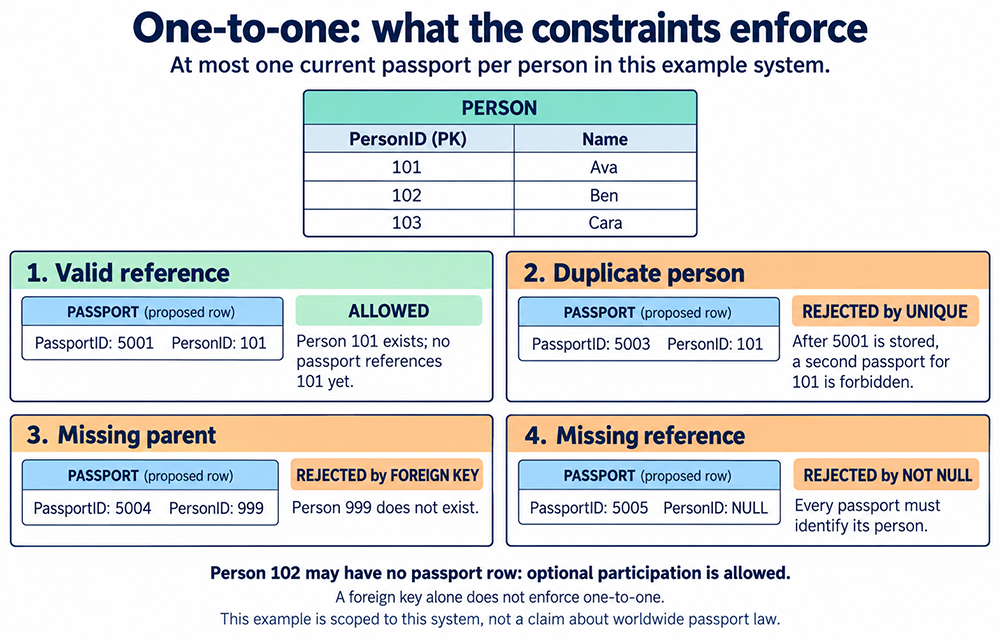
UNIQUE). - Optionality: A person can have zero or one current passport record in this example even when every passport must reference a person. An absent passport row represents that optional participation; the passport foreign key need not be nullable.
One-to-One Relationship Example: Person and Current Passport
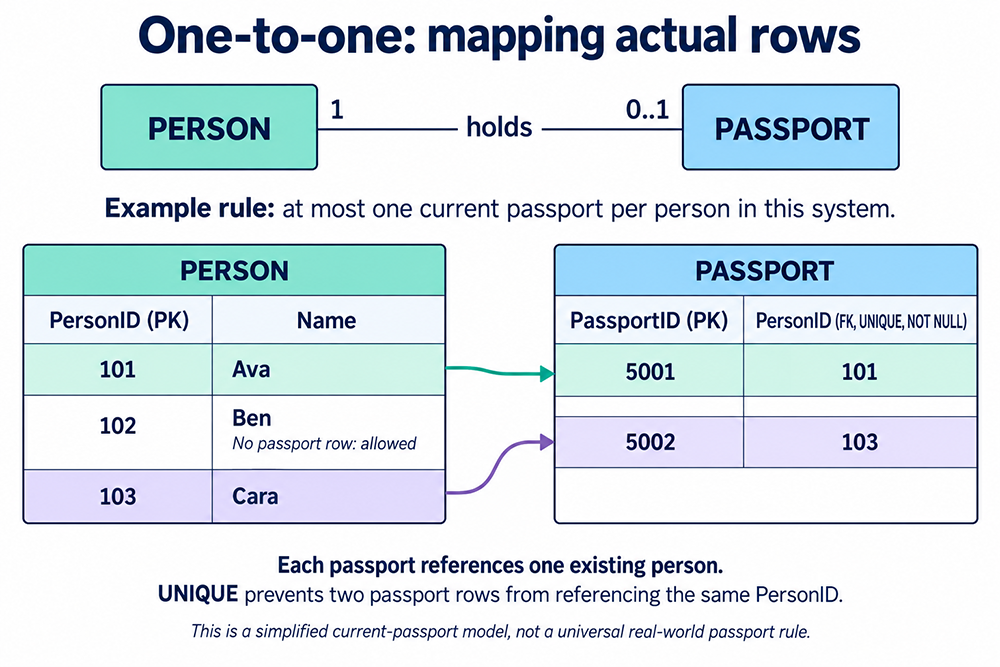
A Person stores the person identity and name. A separate Passport stores a current passport record. The person may exist without that record; a stored passport number is required. As in Lesson 3, this system permits at most one current passport record per person, and every passport belongs to exactly one person. This is a simplified rule for the example system, not a universal claim about passports or renewal history. The person-to-passport participation is 0..1; the passport-to-person participation is 1.
A foreign key alone would allow several passports for the same person, creating a one-to-many relationship. Adding uniqueness to that foreign key, or making it the passport's primary key, enforces the one-to-one upper bound.
One-to-One Relationship Diagrams
Read the Mapping in Both Directions
| Starting row | Related row | Meaning |
|---|---|---|
| Person 101 (Ava) | Passport 5001, PersonID 101 | One current passport |
| Person 102 (Ben) | No passport row | Optional participation: zero is allowed |
| Person 103 (Cara) | Passport 5002, PersonID 103 | One current passport |
| Passport 5001 | Person 101 (Ava) | Exactly one existing person |
| Passport 5002 | Person 103 (Cara) | Exactly one existing person |
The match uses Passport.PersonID = Person.PersonID, not the visual row position and not PassportID = PersonID. The two tables have different primary keys in this unique-foreign-key design. PersonID in Passport is both a foreign key and unique.
How to Implement a One-to-One Relationship in SQL
These are alternative designs for the same person-passport example. Run either design in a fresh schema; do not run both definitions of the same tables together. Supply integer identifiers explicitly.
Option 1: Shared Primary Key
CREATE TABLE Person (
  PersonID INT NOT NULL PRIMARY KEY,
  PersonName VARCHAR(100) NOT NULL
);

CREATE TABLE Passport (
  PersonID INT NOT NULL PRIMARY KEY,
  PassportNumber VARCHAR(30) NOT NULL,
  CONSTRAINT fk_passport_person
    FOREIGN KEY (PersonID) REFERENCES Person(PersonID)
);
The passport's primary key prevents two passports for one person. Its foreign key prevents a passport from referencing a nonexistent person. A person without a passport is still allowed.
Option 2: Unique Foreign Key
CREATE TABLE Person (
  PersonID INT NOT NULL PRIMARY KEY,
  PersonName VARCHAR(100) NOT NULL
);

CREATE TABLE Passport (
  PassportID INT NOT NULL PRIMARY KEY,
  PersonID INT NOT NULL,
  PassportNumber VARCHAR(30) NOT NULL,
  CONSTRAINT uq_passport_person UNIQUE (PersonID),
  CONSTRAINT fk_passport_person
    FOREIGN KEY (PersonID) REFERENCES Person(PersonID)
);
This design gives the passport its own identifier. UNIQUE still limits each person to one passport, while NOT NULL and the foreign key require every passport to reference a person.
Does a Unique Foreign Key Require a Passport for Every Person?
No. Neither design requires every person to have a passport. If participation must be mandatory on both sides, use an additional enforcement mechanism appropriate to your DBMS and transaction rules, or consider whether the attributes belong in one table.
If both sides may exist independently, a nullable unique foreign key can represent an unassociated row. Check your DBMS's treatment of nulls in unique constraints before using that variation.
Compare this design with one-to-many relationships and the three relationship types. The business rule determines the cardinality; splitting a table by itself does not establish a one-to-one relationship.
Real-World Use Cases
- User & Authentication:
User(UserID)↔UserAuth(UserID, PasswordHash, MFA...)(privacy, audit). - Employee & HR Profile: Split confidential compensation/benefits from general HR data.
- Entity & Settings: Optional per-entity configuration without polluting the base table with many nullable columns.
- Document & Blob: Keep large LOBs in a companion table to avoid bloating the hot row.
Connectivity and Cardinality Notes
Connectivity indicates one or many per side; 1:1 means “one” on both sides. The cardinality (actual counts) can vary by instance, but constraints enforce the upper bound. The minimum participation must also be specified. An absent companion row can express optional participation; NOT NULL plus a foreign key requires a referencing row to have a parent, but does not require every parent to have a referencing row.
Be careful not to model a disguised 1:N as 1:1. If, over time, multiple B rows per A appear, your 1:1 will be violated—check business rules and sample data.
The next lesson continues with additional 1:1 design nuances and edge cases.