| Lesson 11 | Using multiple criteria |
| Objective | Use multiple criteria to limit the results of a query. |
Using Multiple Criteria in Microsoft Access 365
In many real-world situations, a single criterion is not enough to narrow a query to the records you truly care about. You may want to limit results to a specific client and a particular date range, or show records that match one company or another. In Microsoft Access 365, you use multiple criteria and logical operators to express these conditions in the query design grid.
Logical Operators in Queries
The table below summarizes the most common logical operators:
Logical Operators |
|
| Operator | How it works |
|---|---|
| AND | Returns records only when all criteria are true for that record. |
| OR | Returns records when at least one of the criteria is true. |
| NOT | Returns records where the specified criterion is false. |
AND is the more restrictive operator because all conditions must be satisfied. OR is more permissive, because a record is shown if it satisfies any one of the listed conditions.
Multiple Criteria in a Single Row (AND logic)
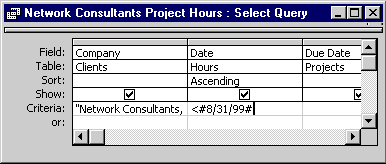
Field:      Company                 Date                 Due Date
Table:      Clients                 Hours                Projects
Sort:                             Ascending
Show:       Yes                     Yes                  Yes
Criteria:   "Network Consultants,"  < #8/31/99#
Or:
- Company equals
"Network Consultants,", and - Date is earlier than
#8/31/99#.
Using OR Rows in the Query Grid
Access treats criteria as follows:
- Criteria on the same row → combined with AND (the record must satisfy all conditions on that row).
- Criteria on different rows (Criteria vs. Or, Or vs. next Or) → combined with OR (the record may satisfy any one row of conditions).

+-----------+---------+-----------+
| Field     | Table   | Sort      |
+-----------+---------+-----------+
| Company   | Clients | (none)    |
| Date      | Hours   | Ascending |
| Due Date  | Projects| (none)    |
+-----------+---------+-----------+
Criteria and Or rows are used to combine conditions across these fields.
- Company = "Network Consultants," AND Date < #8/31/99#
- OR Company = "ABC Webworks"
- OR Due Date < #9/30/99#
How Multiple Criteria Are Evaluated
- Across a row: criteria are joined with AND.
- Down the grid (Criteria row followed by Or rows): each row is joined with OR.
For example:
Row 1 (Criteria):  Company = "Network Consultants,"   AND   Date < #8/31/99#
Row 2 (Or):        Company = "ABC Webworks"
Row 3 (Or):        Due Date < #9/30/99#
A record will be included if:
- It meets both conditions on Row 1, OR
- It meets the condition on Row 2, OR
- It meets the condition on Row 3.
This combination allows you to express powerful filters using only the design grid—no manual SQL required.
Putting It All Together
To use multiple criteria effectively in Microsoft Access 365:
- Decide which conditions must all be true together (place these on the same row).
- Decide which conditions represent alternative scenarios (place these on separate Or rows).
- Switch to Datasheet View to test your logic and confirm that only the intended records are returned.
By understanding how AND and OR work within the design grid, you can build precise filters that return exactly the data your query needs.
Matching Access Criteria - Quiz
Matching Access Criteria - Quiz