| Lesson 7 | Saving a query design |
| Objective | Identify the ways to save a query design. |
Saving a Query Design in Microsoft Access 365
Microsoft Access 365 provides multiple ways to save a new or modified query design. Because Access treats queries as objects within the database, any change, whether made in Design View or Datasheet View—triggers Access to confirm whether you want to save those changes. Understanding these save options ensures you preserve your work, rename queries correctly, and reuse query designs without overwriting your originals.
When Access Prompts You to Save
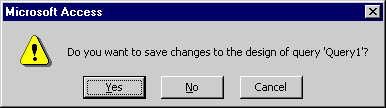
Any time you close a query that has unsaved changes, Access displays a confirmation prompt. This applies to:
- New queries created in Design View
- Queries opened and modified in Datasheet View
- Existing queries edited in Design View
If you choose Yes, Access saves your work. If the query is new, you are asked to provide a name.
Saving a New Query (Save As)
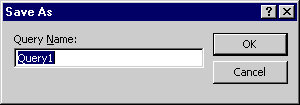
When you save a newly created query, Access displays the Save As dialog box. Here you provide a descriptive, meaningful name before the query is added to the Navigation Pane. After typing the name, click OK or press Enter.
Access Database 2024
Saving Changes to an Existing Query
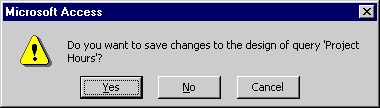
When modifying an existing query, Access again asks whether you want to save your changes before closing the window. Selecting Yes updates the existing query definition.
If you prefer to save your work more frequently—or before closing the query—you may click the Save icon in the Quick Access Toolbar. Access immediately saves the updated design without prompting.

Saving a Query Under a New Name (Modeling or Reuse)
Often you may want to use an existing query as a template for creating a new one. Instead of rebuilding from scratch, you can save or duplicate the query under a new name. This is especially useful in reporting environments where similar queries differ only slightly in fields or criteria.
The following method is recommended:
- Open the original query in Design View.
- Choose File → Save As → Save Object As and provide a new query name. This prevents accidentally overwriting the original query.
- Edit and refine the new query, then save the updated version.
Copying a Query in the Navigation Pane
If you prefer, you can duplicate a query directly from the Navigation Pane:
- Select the query
- Press Ctrl + C (Copy)
- Press Ctrl + V (Paste)
- Enter a new name when prompted
You may also right-click the copied query and choose Rename to update its name after pasting. Copying is a fast way to preserve existing logic while preparing a variant for a different purpose.
With these methods, you can confidently save new queries, update ongoing work, duplicate existing logic, and reuse your designs without losing earlier versions.